The Best Way to Save and Organize Viral Content Inspiration

Saving screenshots is not a system. Here's how to build a viral content vault you actually use — capturing the structure behind every hit, not just the clip — in six steps.
Your saved folder is a graveyard. You bookmarked forty videos that made you stop scrolling, screenshotted a dozen hooks, sent yourself a string of links you never reopened — and when it is time to film, you stare at a blank notes app anyway. The problem is not that you forgot to save inspiration; it is that saving a clip is not the same as saving the idea, and a pile of screenshots is not a system. A real viral content vault for creators does the one thing a camera roll never will: it captures the structure that made a video work, organizes it so you can find it the moment you need it, and turns a dead archive into a shelf of shippable formats. This playbook walks through the exact save-and-organize system — built on Boards, score-card exports, and shareable board URLs — that converts inspiration you hoard into content you actually ship, in six repeatable steps.
Table of contents
- Why your saved folder never becomes content
- What a viral content vault for creators actually stores
- How to build the vault step by step
- Organize it so you USE it, not just hoard it
- Frequently Asked Questions
- Turn your vault into a content engine
Why your saved folder never becomes content
The native save button on every platform is built to bookmark, not to organize. You tap it, the clip drops into an undated, unsorted, untagged pile, and the context that made it worth saving — why this one stopped you — evaporates within a day. A week later the folder is a wall of thumbnails with no labels, no notes, and no way to tell the format you wanted to steal from the one you saved because the cat was cute. So when filming day arrives, opening that folder feels like more work than starting from scratch, and you start from scratch.
There is a second, deeper failure. Even when you do reopen a saved clip, you copy the wrong layer. You re-watch the video and replicate what is visible — the trending sound, the caption style, the cover frame — while the thing that actually carried it stays invisible. The reveal order, the question the first two seconds plant, the payoff held to the final frame: that structure is what produced the retention, and it is exactly what a screenshot cannot hold. TikTok's own newsroom has documented how watch time and completion shape what the system surfaces — so a folder of clips quietly trains you to copy paint instead of engines, which is why so much "inspired" content lands flat.
The fix is to change what you save and how you store it. Stop saving clips as keepsakes and start saving formats as instructions — the beat-by-beat skeleton plus the data that proves the structure traveled. That is the difference between a folder you avoid and a content swipe file you raid every time you sit down to write. Get the input right and the organizing system has something worth organizing.

What a viral content vault for creators actually stores
A vault that gets used stores four things per entry, and a clip is only the first. Miss the other three and you are back to a graveyard with nicer thumbnails.
The clip itself, as the reference — the original video or a link to it, so you can re-watch the execution. This is the part a normal save folder gets right and the only part it gets right.
The structure, written down as beats. Map the skeleton in plain language: "result shown first, then the three steps that produced it, payoff withheld until the final frame." Topics saturate and sounds cool off, but a structural beat ports across niches — a reverse-order reveal that pops in finance works just as well in cooking, because the tension it builds has nothing to do with the subject. The written beats are the reusable asset; the clip is just the proof.
The data that says the structure traveled. A screenshot cannot tell you whether a video over-performed or just rode a big account. An Outlier Score can. ViralVault scores every video against two baselines at once — the creator's own 30-day median and the niche median — so you can store, alongside each saved format, whether it was a true breakout or a vanity number. Save the videos that beat both baselines, the Dual-Highs; 1,400+ videos in the index have cleared both baselines. A vault of those is a vault of formats proven to work, not a vault of things that merely looked big.
The status, so the vault doubles as a pipeline: idea → mapped → shot → posted. Now your archive is not a museum, it is a queue.
ViralVault tip: When a video stops your scroll, do not just bookmark it — pull its score first. If it cleared both the creator and niche median, save the format (the beats), not only the clip, and tag it with the score. ViralVault runs the Outlier Score on any TikTok in your niche free, no card required, at viralvault.studio.
The mechanism that turns these four fields into something durable is the Outlier Score, which is what lets you store proof of virality next to every saved idea instead of a gut feeling you will not trust in two weeks.
How to build the vault step by step
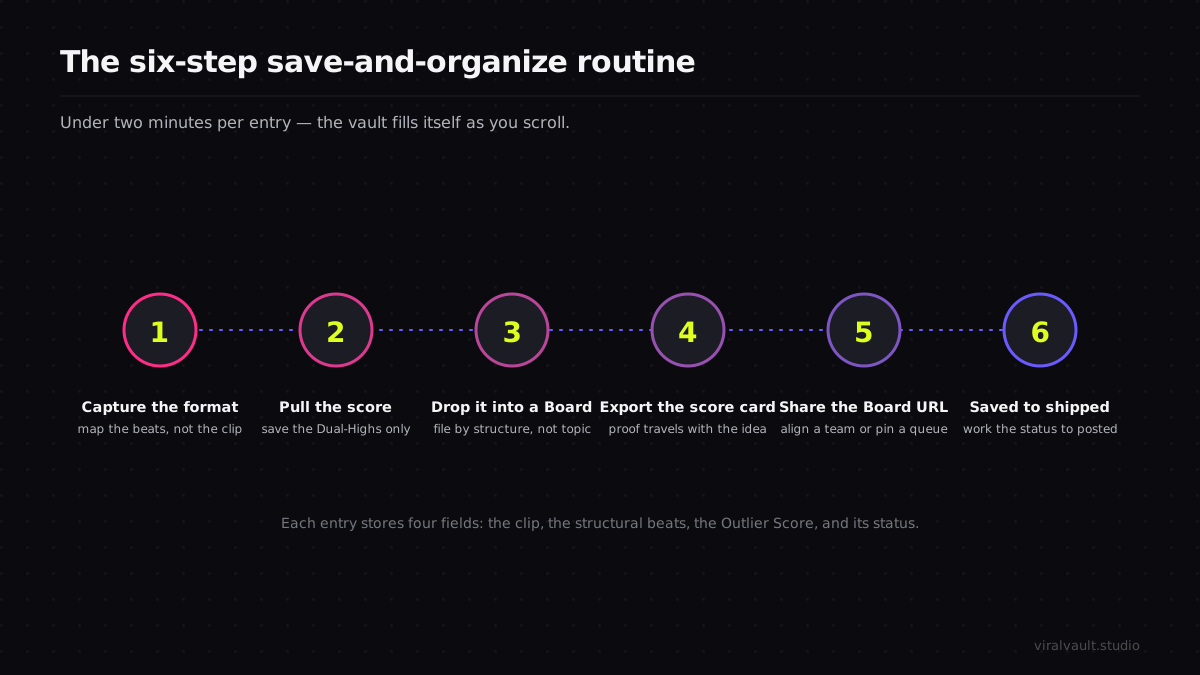
This routine takes about fifteen minutes the first time and under two minutes per entry after that. Run it whenever a video stops your scroll, and the vault builds itself.
Before you save another random clip, start a free vault and capture your first format the right way — structure and score together, not just a thumbnail you will scroll past.
Step 1: Capture the format, not just the clip
When a video stops you, resist the bookmark reflex. Open the original and watch it twice with the sound off, mapping the skeleton: where the hook lands, what question the first two seconds plant, in what order information is revealed, and where the payoff is withheld. Write that down as a sequence of beats in plain language. This single step is what separates a swipe file from a screenshot pile — you are saving the engine, not the paint, and the engine is the part that ports to your own subject cleanly.
Step 2: Pull the score before you save
A format is only worth a slot in the vault if the data says it traveled. Run the saved video's Outlier Score and check both baselines — did it beat the creator's 30-day median, the niche median, or both. Save the Dual-Highs and skip the videos that only looked big because a large account posted them. Storing the score next to the beats means that two weeks later you are not relying on a fuzzy memory of "this felt viral"; you have the receipt that says it actually over-performed, which is the difference between a format you trust and one you second-guess.
Step 3: Drop it into a Board
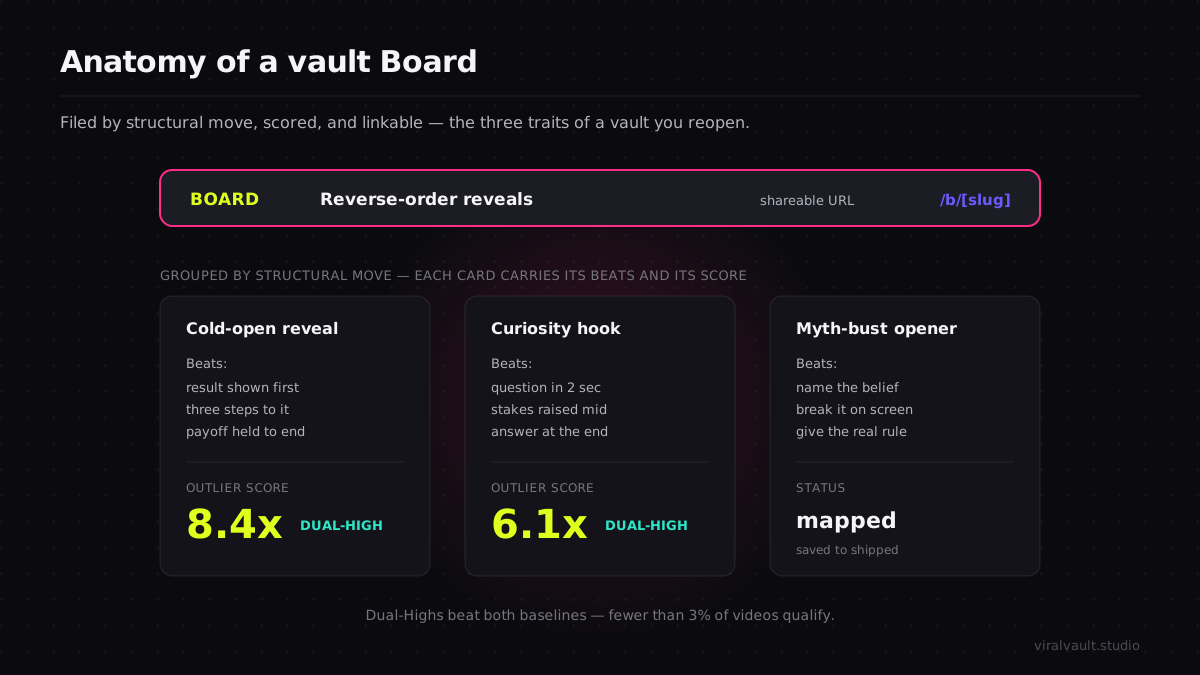
A flat list of saved formats is just a tidier graveyard, so file each entry into a Board the moment you save it. Create a Board per niche, per series, or per content pillar — "cold-open reveals," "finance explainers," "this month's shoots" — and put the format where you will actually look for it. Boards live at a clean URL (/b/[slug]), so each one is a sortable, revisitable collection rather than an endless scroll. The act of choosing which Board an entry belongs in forces you to categorize it while the context is still fresh, which is the exact step a native save button skips and the reason its folder rots.
Step 4: Export the score card for the formats you will reshoot
For any format you are committing to film, export its score card as a PNG. The card carries the video's Outlier Score and the creator-versus-niche context in one image you can drop into a content doc, a shot list, or a brief for whoever edits with you. This matters because the proof travels with the idea — when you or a teammate opens the brief later, the reason this format earned a shoot is right there, not buried back in a tool nobody reopens. It also keeps the vault honest: a format with a screenshot of its score is one you vetted, not one you vibes-saved.
Step 5: Share the Board to align your team or pin your queue
Because every Board has its own URL, you can hand the whole collection to an editor, a co-creator, or a client without exporting anything or granting tool access. Send the board link and they see the formats, the scores, and the beats in one place — no "which folder did you mean," no re-explaining why each clip is there. Even as a solo creator, the URL is useful: pin it as your filming queue so the next three formats you are shooting are one tap away from wherever you work. A vault you can link to is a vault you actually open.
Step 6: Work the status from saved to shipped
A vault is a pipeline, not a museum, so move every entry through its stages: saved → mapped → shot → posted. When you film a format, mark it; when it posts, score your version against your own median to confirm the structure carried for you too. This closes the loop — formats that beat your median get reshot with a new subject, formats that missed get autopsied for the broken beat, and the Board becomes a living record of what works for your account specifically, not a static collection of other people's hits.
Organize it so you USE it, not just hoard it
The hard part of any swipe file is not saving — it is making the saved thing findable and trusted enough that you reach for it under deadline. Three organizing principles separate a vault you raid from one you abandon.
Organize by structure, not by topic. The instinct is to file by subject — "fitness," "money," "skincare" — but subjects saturate and the file goes stale. File by the structural move instead: "reverse-order reveals," "two-second curiosity hooks," "myth-bust openers." A structure-first vault stays evergreen because a beat that worked last quarter still works this quarter, and it surfaces cross-niche ideas a topic folder would hide. The early-detection method for spotting which structures are rising before they saturate lives in the viral content discovery guide, and it pairs directly with a structure-first vault.
Keep the proof attached. Every entry should carry its score, not just its clip, so future-you can sort the vault by what over-performed and film the strongest formats first. A swipe file without proof is a wish list; a swipe file with an Outlier Score on every card is a ranked shoot queue. This is the single habit that makes a vault worth opening twice.
Prune on a cadence. A vault is only as useful as its signal-to-noise ratio, so once a month archive the formats you have already milked and the saves that no longer fit your direction. Saving is easy and accumulates clutter; the discipline is subtraction. A lean Board of twenty proven, well-labeled formats beats a bloated folder of four hundred you will never scroll, every time.
When you save and organize this way, the vault stops being a place inspiration goes to die and becomes the first place you look when the camera is up. The repurposing payoff is large: one well-mapped format can seed a full week of content across angles and platforms, because the structure is reusable by design.

Frequently Asked Questions
Q: What is the best way to save viral content inspiration so I actually use it? A: Save the format, not just the clip. For every video that stops you, write down its structural beats — the hook, the reveal order, the withheld payoff — attach its Outlier Score as proof it over-performed, and file it into a Board organized by structural move rather than topic. That turns a passive bookmark folder into a ranked, reusable shoot queue you reach for under deadline.
Q: Why does my content swipe file never turn into actual videos? A: Because a swipe file of raw clips stores the wrong layer. Screenshots capture what a video looks like, not how it was built, so reopening one gives you nothing to act on. Store the beat-by-beat structure plus the data that proves the format traveled, organized by structural move. A swipe file built from mapped formats and scores reads like instructions, so filming day starts from a plan instead of a blank page.
Q: How should I organize content inspiration — by topic or another way? A: Organize by structure, not topic. Topic folders ("fitness," "money") saturate and go stale, and they hide cross-niche ideas. Filing by the structural move — reverse-order reveals, curiosity hooks, myth-bust openers — keeps the vault evergreen, because a beat that worked last quarter still works this one, and it surfaces formats you can port into your own niche from anywhere.
Q: Do I need a tool, or can I just use my phone's saved folder? A: A saved folder bookmarks; it does not organize, score, or store structure, which is why it rots into a graveyard. A purpose-built vault adds the three things the folder lacks: Boards that file each entry by structure, an Outlier Score that proves the format over-performed, and a shareable board URL plus PNG score-card export so the proof travels with the idea to your shot list or your editor.
Q: How many saved formats should I keep in my vault? A: Fewer than you think, kept lean on purpose. A vault's value is its signal-to-noise ratio, so prune monthly — archive formats you have already milked and saves that no longer fit your direction. Twenty proven, well-labeled, scored formats you will actually film beat four hundred random clips you will never scroll. Saving is easy; the discipline that makes a vault useful is subtraction.
Turn your vault into a content engine
The best way to save and organize viral content inspiration has nothing to do with saving more and everything to do with building a viral content vault for creators that you actually reopen. Stop hoarding clips and start banking formats: capture the structure as beats, attach the Outlier Score that proves it traveled, file it into a Board organized by structural move, export the score card, and share the URL so the proof rides with the idea. Prune monthly so the signal stays clean, and work each entry from saved to shipped so the archive doubles as your filming queue. Done right, your vault stops being a folder you avoid and becomes the first place you look when the camera is up. Spin up a free account, build your first Board, and turn the saved folder you never open into a content engine you raid every week — start at viralvault.studio.