TikTok Content Gap Tool: A Tutorial for Sub-10K Accounts

Small accounts win underserved searches, because TikTok ranks the best answer, not the biggest follower count. Here's the exact tap-by-tap tutorial to find gaps you can rank for under 10K.
If you are under 10K followers, the For You page can feel like a wall you cannot get over — the big accounts already own every trend by the time you spot it. Search is the door around that wall, and learning how to use TikTok content gap tool screens is the most beginner-friendly way through it. The reason is the part nobody tells small creators: TikTok search ranks the best answer to a query, not the biggest account that posted one. A 900-follower video that genuinely answers an under-served search can sit above a 2M-follower video that does not, because relevance and watch time decide the slot, not your count. That is the whole opening for a small account — there are searches with real demand and almost no good videos answering them, and you do not need a big following to win those. This tutorial walks you through the exact taps: where the tool lives, what each screen shows, how to read which searches a sub-10K account can realistically rank for, and how to turn one into a video that keeps getting found.
Table of contents
- Why small accounts win underserved searches
- Where the content gap tool lives and what you will see
- How to use TikTok content gap tool screens step by step
- Reading competition like a small creator
- Frequently Asked Questions
- Start with the gaps you can rank for today
Why small accounts win underserved searches
Trends reward reach; search rewards relevance. On the For You page, an account with millions of followers gets a head start because the system already has signal that its videos hold attention. Search works differently. When someone types a query, TikTok is trying to return the video that best satisfies that question, and a small creator who answers it directly — clearly, fully, in the words the searcher used — can outrank a much larger account that only brushed the topic. Follower count is not the tiebreaker; how well the video matches the search is. That single difference is why search is the right first lane for anyone building under 10K followers.
A content gap is where this gets practical for small creator content gaps specifically. A gap is a query with heavy demand and thin supply — people are clearly searching it, and there are few good videos answering it. On a crowded trend you are the thousandth near-identical clip fighting for one viewer; on a gap you might be one of three real answers in the lane. You are not asking the algorithm to pick you over a giant account on a saturated topic. You are filling an empty shelf the giant accounts never bothered to stock, and the searcher who finds you stays because you actually answered the thing they typed.
This is also durable in a way a feed spike is not. A trend dies in days and takes your video's reach with it. A video that answers an under-served search keeps getting found every time someone types that query — next week, next month, after the For You push is long gone. For a small account, that compounding is the difference between starting from zero every post and building a back catalogue that quietly pulls views on its own. The broader case for why search beats chasing trends is laid out in the TikTok Creator Search Insights guide; this tutorial is the hands-on version for getting your first wins under 10K.
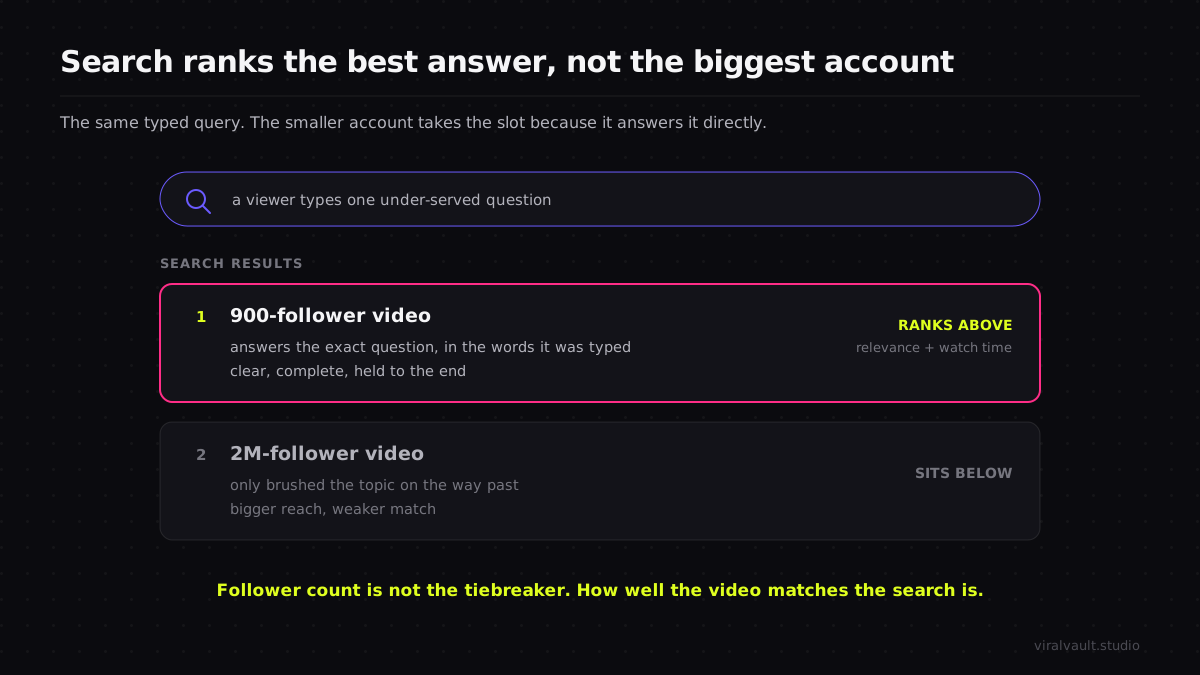
The mindset shift is the whole tutorial in one line: stop trying to out-trend bigger accounts and start out-answering them on questions they ignored. The tool below is just how you find those questions.
Where the content gap tool lives and what you will see
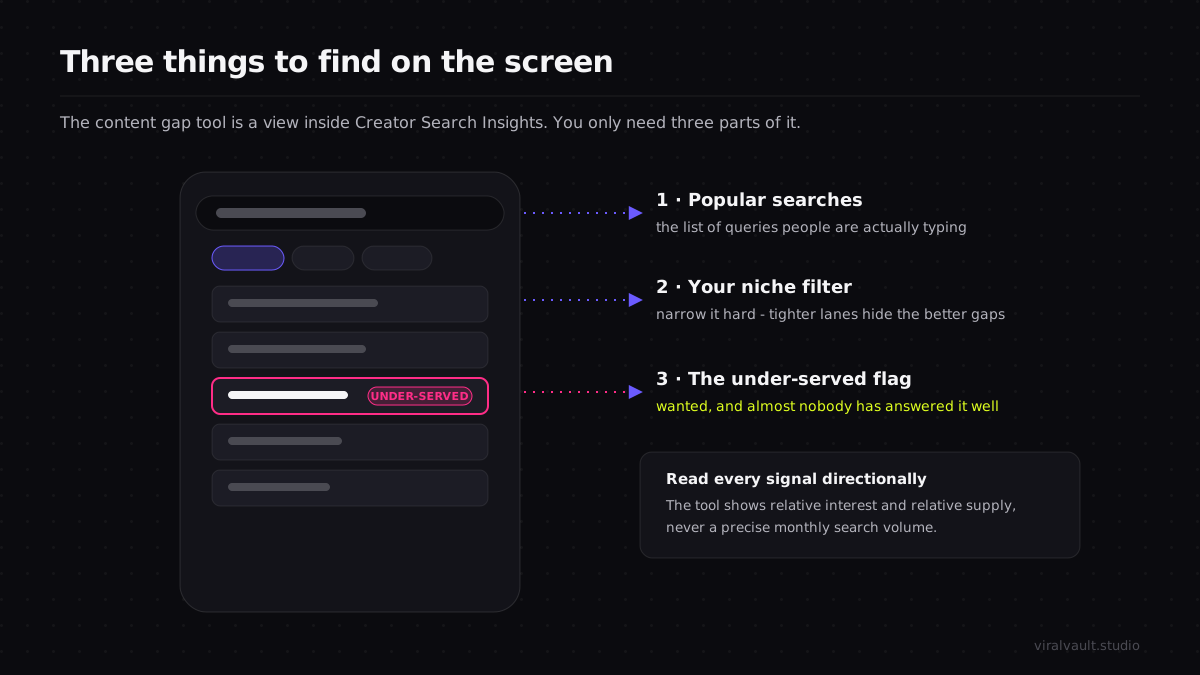
The "content gap tool" is not a separate app — it is the content-gap view inside TikTok Creator Search Insights, TikTok's in-app window into what people actually type into the search bar. To open it, go to the search bar in the TikTok app and search the phrase Creator Search Insights, then tap into the official tool that surfaces. (TikTok has expanded access to it over time, so if it does not appear, it may not have rolled out to your account or region yet — TikTok's newsroom is where the platform documents these rollouts.) Once inside, you are looking at a few simple screens, and you only need three things on them.
First, popular searches — a list of queries people are typing, often filterable by topic or niche. Second, the niche or category filter, usually along the top or side, which narrows that list to your lane so a finance creator is not staring at beauty searches. Third, and the one that matters most, a flag on certain queries marking them as having comparatively few videos answering them relative to the interest — that flag is the content gap. Some of the interface also labels recommended topics for creators; treat anything marked under-served or low-content as a candidate gap.
One discipline keeps a beginner out of trouble here. The tool shows relative interest and relative content levels — it does not hand you a precise monthly search volume you can drop into a spreadsheet. Read every signal directionally: "this is clearly wanted and clearly under-served" is the read you want, never "this gets exactly 4,000 searches a month." Inventing a hard number where TikTok only gives you a relative one is how a confident beginner makes a confident wrong bet. When you want to see which structures already over-perform on a topic you found, run a free ViralVault search on it before you script anything, so you build on a shape that is proven to hold attention rather than a blank page.
How to use TikTok content gap tool screens step by step
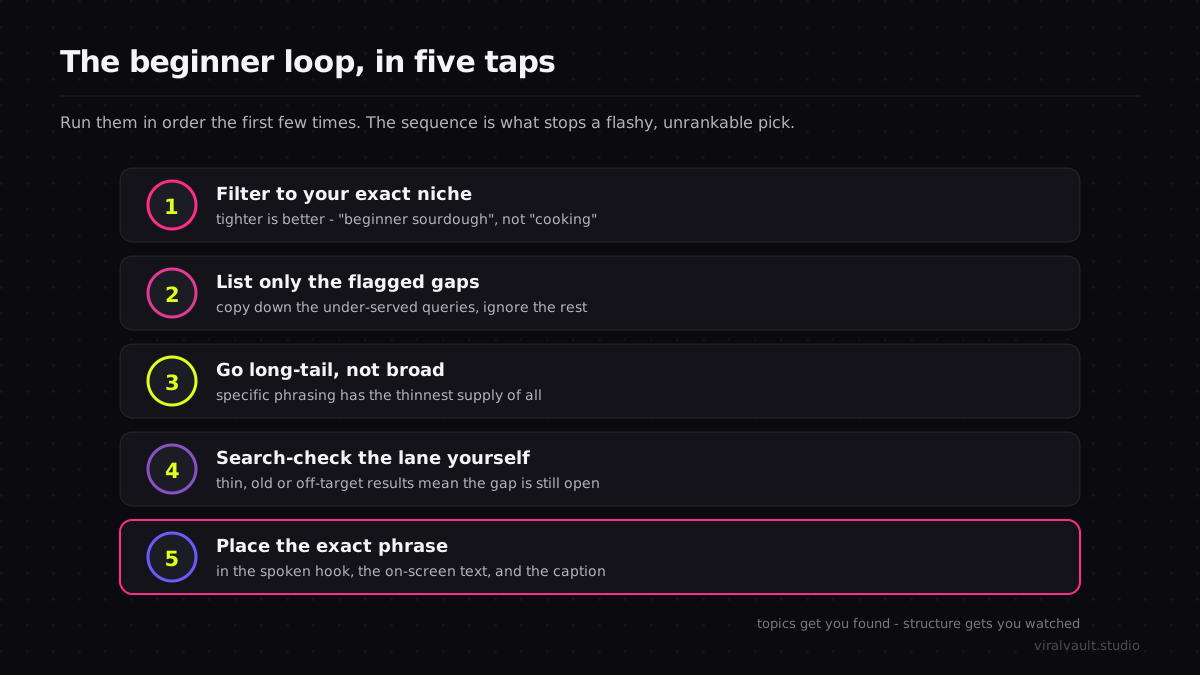
Run these in order the first few times. Once the read becomes second nature you will move faster, but the sequence is what stops a beginner from grabbing a flashy gap that is impossible to rank for at your size.
Step 1: Open the tool and filter to your exact niche
Search Creator Search Insights in the TikTok app and open the tool, then tap the niche or category filter and narrow it to your lane as tightly as you can. Filtering is not optional for a small account — it is the step that makes the read honest. A query that looks tiny against the whole platform can be substantial inside a narrow niche, and the in-niche framing is the only way to tell the difference. Tighter is better here: "beginner sourdough" is a more useful lane than "cooking," because the gaps inside a narrow niche are exactly the under-served corners a small creator can own before anyone larger notices.
Step 2: Write down only the under-served, gap-flagged searches
Scroll the popular searches and copy into a notes doc only the queries carrying the under-served or low-content flag — ignore everything else on the first pass. You are building a shortlist of gaps, not a list of every popular topic. A popular search with the gap flag is a query people want answered that almost nobody has answered well, which is precisely the shelf you can stock. A popular search without the flag means the lane is already full, and at your size you do not want to walk into a crowded one yet. Aim to capture five to ten flagged gaps so you have room to filter them down in the next step.
Step 3: Favor specific, long-tail phrases over broad ones
From your shortlist, push toward the most specific phrasings. A broad gap like "budgeting" is harder to win even when it is under-served, because the few videos answering it are competing for a huge, vague audience. A long-tail gap — "budgeting on an irregular freelance income," "first apartment grocery budget" — is narrower, has even thinner competition, and tells you exactly what to make. Specific queries are the sweet spot for small creator content gaps: they are easier to answer completely, easier to rank for because the supply is thinnest, and they attract a viewer with a precise need who is more likely to follow the account that solved it.
Step 4: Sanity-check the lane by searching it yourself
Before you commit, take each finalist gap and type it into the regular TikTok search bar to see what actually shows up. This is the beginner step the tool alone will not do for you. If the top results are a handful of thin, old, or off-target videos, the gap is real and rankable — make it. If the top results are already a wall of strong, recent videos from larger accounts, the supply has filled since the flag updated, and you should set that one aside and move to the next on your list. This thirty-second manual check is what separates a gap you can rank for today from one that closed last week.
Step 5: Put the exact phrase in your hook, on-screen text, and caption
TikTok search reads the words you say and show, not just your caption. So when you make the video, place the exact gap phrase in your first line of on-screen text, say it out loud in the first few seconds, and include it in the caption. This is not keyword stuffing — it is making the video unmistakably answer the precise question being typed, in the words it is being typed in. A small account that nails this match can rank above a bigger one that buried the same answer three sentences deep. The phrase is your signal to search that this is the video that satisfies that query.
Reading competition like a small creator
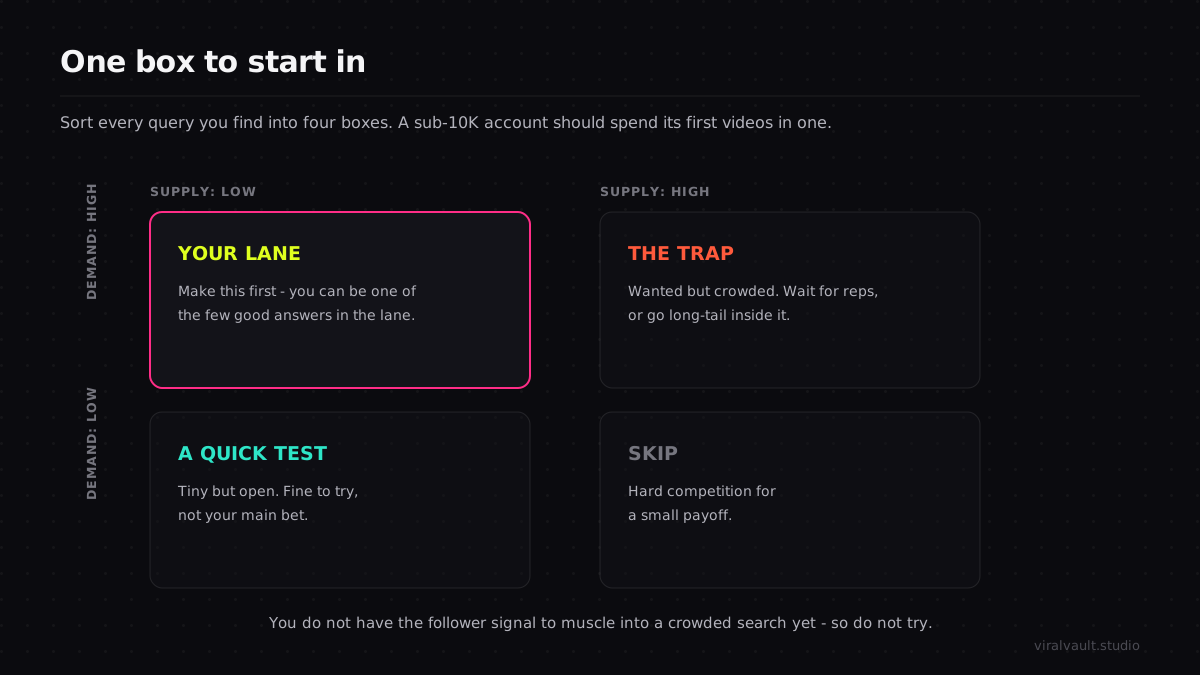
The single skill that turns this tool into growth for a sub-10K account is reading supply honestly. A gap is only a gap if you can actually rank for it now, and that depends on what is already in the lane. The four-box read below is the fastest way to sort any query you find, and only one box is where a small account should spend its first videos.
| Demand | Supply | What a sub-10K creator should do |
|---|---|---|
| High | Low | Your lane — make this first, you can be one of few good answers |
| High | High | Wanted but crowded — wait until you have more reps, or go long-tail inside it |
| Low | Low | Tiny but open — fine as a quick test, not your main bet |
| Low | High | Skip — hard competition for a small payoff |
The high-demand, low-supply box is where every early win lives. The trap most beginners fall into is the high-demand, high-supply box: those topics look exciting because the demand number is big, but the lane is already a wall of established accounts, and a brand-new video from a small creator gets buried. You do not have the follower signal yet to muscle into a crowded search, so do not try. Spend your first dozen videos in the low-supply box, stack some search wins, and the bigger lanes get more winnable as your account builds a track record.
ViralVault tip: Found a gap worth committing to? Set a Watchlist on that niche. If its average Outlier Score jumps 50% or more in 24 hours, you get an alert the morning the surge starts — so a small account can move on a rising, already-wanted topic before bigger creators flood it. Start free, with 3 searches a day and no card required, at viralvault.studio.
There is one more piece a demand tool cannot give you, and it is the reason two creators can make a video on the identical searched topic and get opposite results: structure. The tool tells you a topic is wanted; it says nothing about the shape of video that wins it. A video that opens flat loses the viewer in two seconds no matter how perfectly it targets the search; one that opens with the result first, then the steps, holds them to the end. Topics get you found, structure gets you watched. The full breakdown of why copying a topic without its structure flops — and how to map the structure instead — is in why your TikTok content isn't going viral. Pairing an under-served search with a structure proven to over-perform on it is how a small account turns a found viewer into a finished watch.
This is where a discovery tool earns its place beside the gap tool. The ViralVault index tracks 23,000+ videos across 7,800+ creators and rescores them daily, scoring each one against two baselines at once — the creator's own median and the niche median — so a small account can see which structures genuinely broke a ceiling rather than which simply rode a big follower base. That second read matters most for beginners, because an 80,000-view video on a tiny account often teaches you more than a two-million-view video from a creator who already had the audience. The wider method for spotting those rising structures early is in the viral content discovery guide; run it alongside the gap workflow here and you have both halves — the topic that gets you found and the shape that gets you watched.
Frequently Asked Questions
Q: Can a small account under 10K followers actually rank in TikTok search? A: Yes. TikTok search returns the video that best answers a query, not the one from the biggest account. A small creator who directly and completely answers an under-served search can rank above a much larger account that only touched the topic. Follower count is not the tiebreaker — relevance and watch time are — which is exactly why search is the most winnable lane for sub-10K creators.
Q: How do I use the TikTok content gap tool as a beginner? A: Search Creator Search Insights in the TikTok app, open the tool, and filter to your niche. List only the queries flagged as under-served, favor specific long-tail phrasings, then type each finalist into the regular search bar to confirm the lane is still thin. Make the video, and place the exact phrase in your hook, on-screen text, and caption so search knows you answer it.
Q: What makes a content gap good for a small creator specifically? A: The best small creator content gaps are high-demand, low-supply, and long-tail. Long-tail phrasings have the thinnest competition, tell you exactly what to make, and attract a viewer with a precise need who is likely to follow whoever solves it. Avoid high-demand, high-supply topics early — those lanes are walls of established accounts, and a new small-account video gets buried.
Q: Does the content gap tool tell me how to make the video? A: No. It is a demand map — it tells you a topic is wanted, not how to build the video that wins it. Two creators on the identical searched topic get opposite results because the hook and structure decide watch time. Pair the gap with a dual-baseline tool to see which formats genuinely over-perform on the topic, then copy that structure, not just the subject.
Q: How long until a search-targeted video starts getting views? A: Search-driven views build differently from a For You spike. A video answering an under-served query keeps getting found every time someone types it, so reach often accumulates steadily over weeks rather than arriving in one burst. For a small account that compounding is the point — a back catalogue of gap-filling videos quietly pulls views long after each one is posted.
Start with the gaps you can rank for today
The reason this works for a small account comes back to one fact: search ranks the best answer, not the biggest follower count. Knowing how to use TikTok content gap tool screens lets a sub-10K creator find the exact searches that are wanted, under-served, and rankable right now — then own them before larger accounts notice the shelf is empty. Filter to a tight niche, list only the flagged gaps, push toward specific long-tail phrasings, search-check that the lane is still thin, and place the exact phrase where TikTok reads it. Pair each gap with a structure proven to hold attention so the viewer who finds you also finishes the video. None of this needs a big following — it needs the discipline to answer questions the giants ignored. Spin up a free account, find your first under-served search, and start ranking for the gaps you can win today — begin at viralvault.studio.