Cross-Platform Viral Content Tracker: Monitor Every Niche

Stop checking one niche at a time. Here is how to run a multi-niche command center from a single cross-platform viral content tracker — niche views, Boards, and alerts that watch everything for you.
If you run more than one niche, the problem is never finding a single viral video — it is watching all of them without burning an hour a day per niche. A cross-platform viral content tracker fixes that by turning a scattered set of browser tabs into one command center: several niche views in the same place, a saved shelf of proven outliers per niche or client, and an alert system that watches every niche so you do not have to check each one by hand. The honest version up front: ViralVault is TikTok-native, so the scoring engine reads TikTok. The "cross-platform" job here is breadth across the 12 niches in the Today tab plus the Reels and Shorts adaptations surfaced through the same index — not a literal scraper crawling every social network. This guide shows how to stand that command center up in about thirty minutes, then let it run.
Table of contents
- What a multi-niche command center actually is
- Why one cross-platform viral content tracker beats ten tabs
- How to build the command center step by step
- What running it from one place changes
- Frequently Asked Questions
- Set up your cross-platform viral content tracker today
What a multi-niche command center actually is
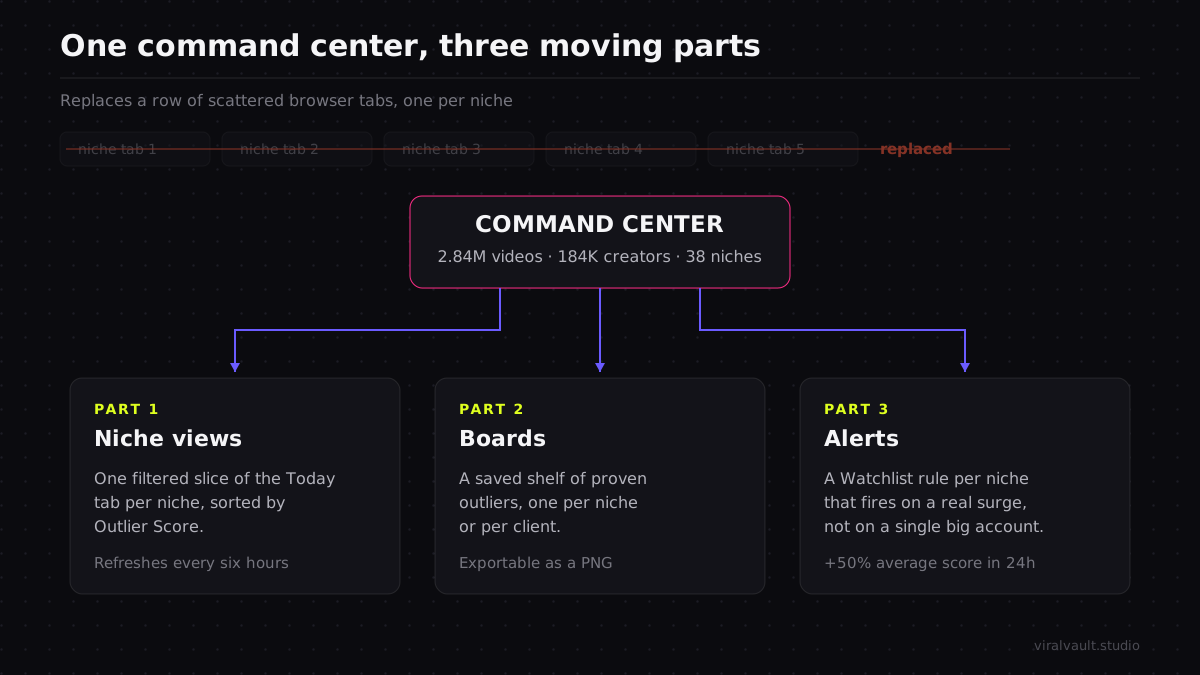
A command center is three moving parts working together, not a single dashboard you stare at. The first part is the niche view — a filtered slice of the Today tab pointed at one niche, sorted by Outlier Score so the over-performers float to the top. The second is the Board — a saved shelf where you pin the outliers worth keeping, one Board per niche or per client, exportable as a PNG you can drop into a brief or a deck. The third is the alert — a Watchlist rule that fires when a niche's average Outlier Score jumps 50% or more in 24 hours, which is the system telling you a niche just got hot without you opening it.
Stacked together, those three parts change the daily job from go look at each niche to let the niche tell you when to look. The Today tab already curates what is over-performing across 12 niches and rescores them daily, so each niche view is a live feed rather than a snapshot you have to manually refresh. The ViralVault index behind it tracks 23,000+ videos across 7,800+ creators on the same daily scoring cycle, which is what makes a single tracker credible across every niche at once — every video is scored against the same dual baseline no matter which niche it sits in.
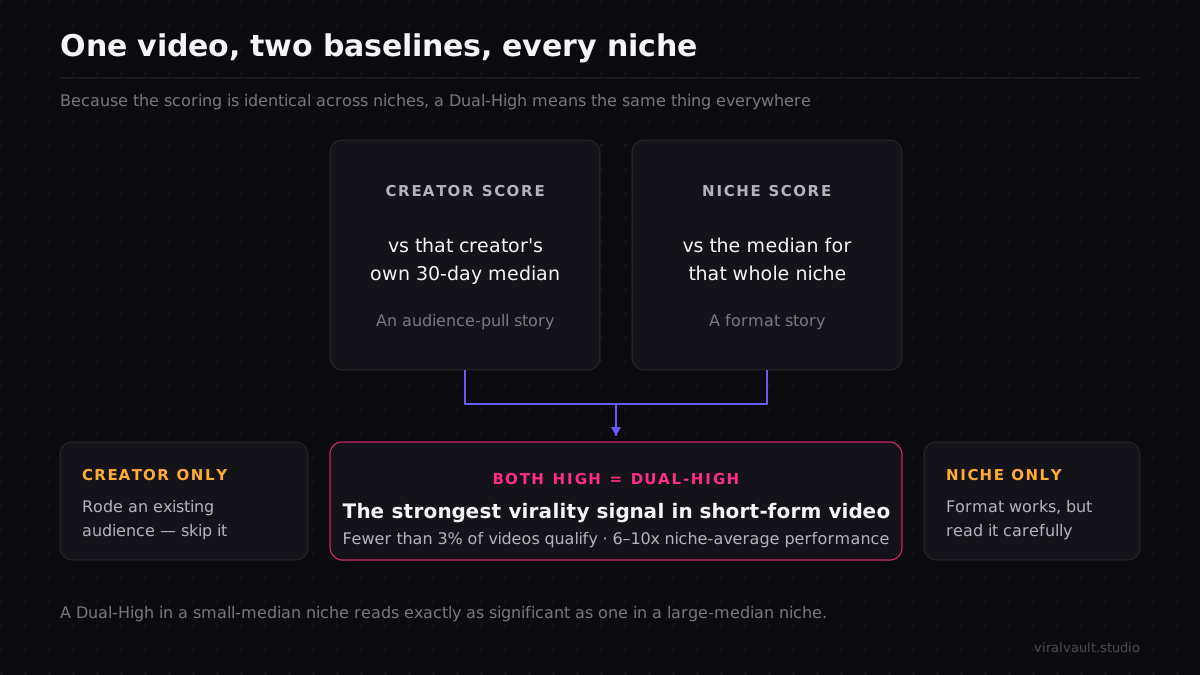
That dual baseline is the engine. Every video gets an Outlier Score built from two parts: a Creator Score that measures the video against the creator's own 30-day median, and a Niche Score that measures it against the niche median. A high Creator Score alone is an audience-pull story. A high Niche Score is a format story. When both are high — a Dual-High — you are looking at the strongest virality signal in short-form video: 1,400+ videos in the index have cleared both. A command center built to surface Dual-Highs across many niches is a far better use of an hour than ten separate scroll sessions.
Why one cross-platform viral content tracker beats ten tabs
The tab-per-niche habit fails for a structural reason, not a discipline one. Each open tab shows raw video counts with no shared reference, so you end up comparing a niche where 200K views is a breakout against one where 200K is a slow Tuesday. Without a baseline that travels across niches, your eye keeps rewarding whichever niche happens to have the largest accounts, and you miss the genuine outlier sitting in a smaller niche that would actually be easy to copy. A single tracker solves this by scoring every niche on the same dual baseline, so a Dual-High in a 12K-median niche reads as exactly as significant as one in a 2M-median niche.
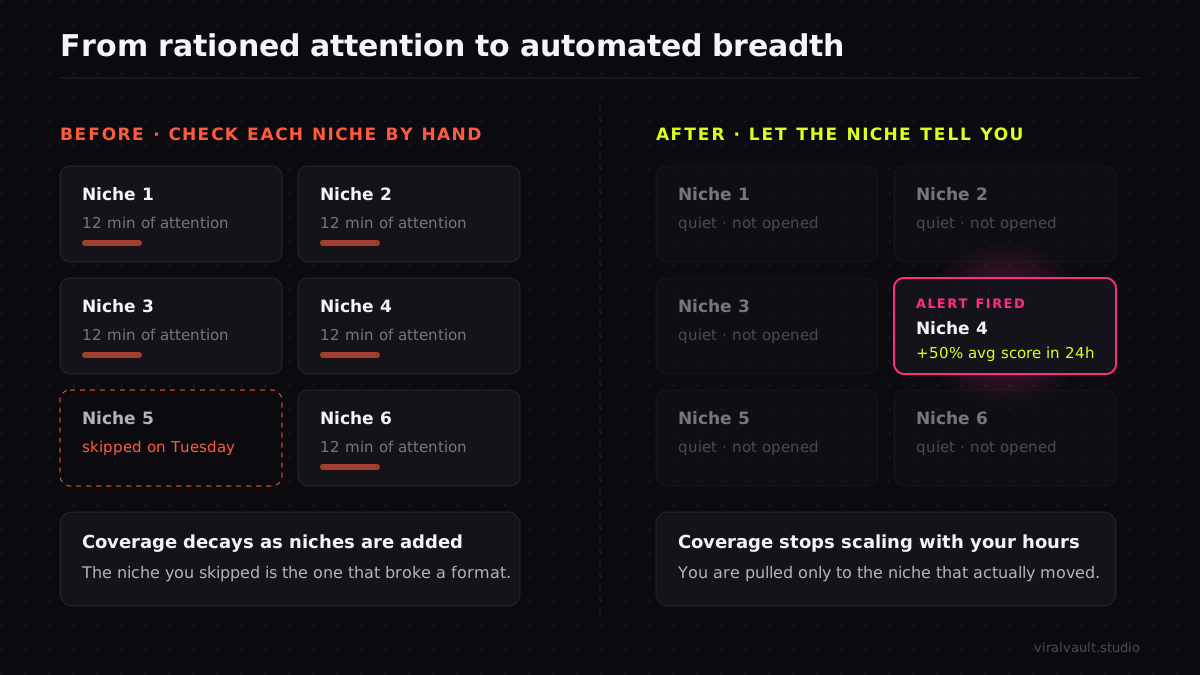
The second failure is coverage decay. Watching five niches by hand means each one gets twelve minutes of attention, and the niche you skipped on Tuesday is the one that broke a format on Wednesday. The window on a rising format is short — a structure climbing on Monday can be saturated by Saturday in a fast niche, because the For You page amplifies a format fast once it starts converting, as TikTok's own newsroom has documented on how watch time and completion shape distribution — so the niche you happened not to open is precisely where the opportunity cost hides. An alert layer flips that: instead of rationing your attention evenly and missing things, you ignore quiet niches entirely and get pulled to the one that just moved. To track viral content across platforms responsibly, the breadth has to be automated, because human attention does not scale to a niche list checked by hand every day.
There is a deeper discovery method underneath all of this — catching a format while it is still rising rather than after it peaks — and the viral content discovery guide covers that lifecycle in full. For multi-account research where you also need to track which creators keep producing the outliers, the TikTok creator search guide goes deeper on reading a creator's catalog rather than a single video.
Set up one niche view and one Board before you do anything else, then open a free account and watch a single niche for a week — the command center is far easier to trust once you have seen one niche's outliers stack up in a Board you built yourself.
ViralVault tip: Name your Boards after the client or campaign, not the niche — "Beauty DTC Q3" instead of just "beauty." When a format breaks, you want to drop the PNG straight into the right brief without renaming anything. Spin up your first Board free, no card required, at viralvault.studio.
How to build the command center step by step
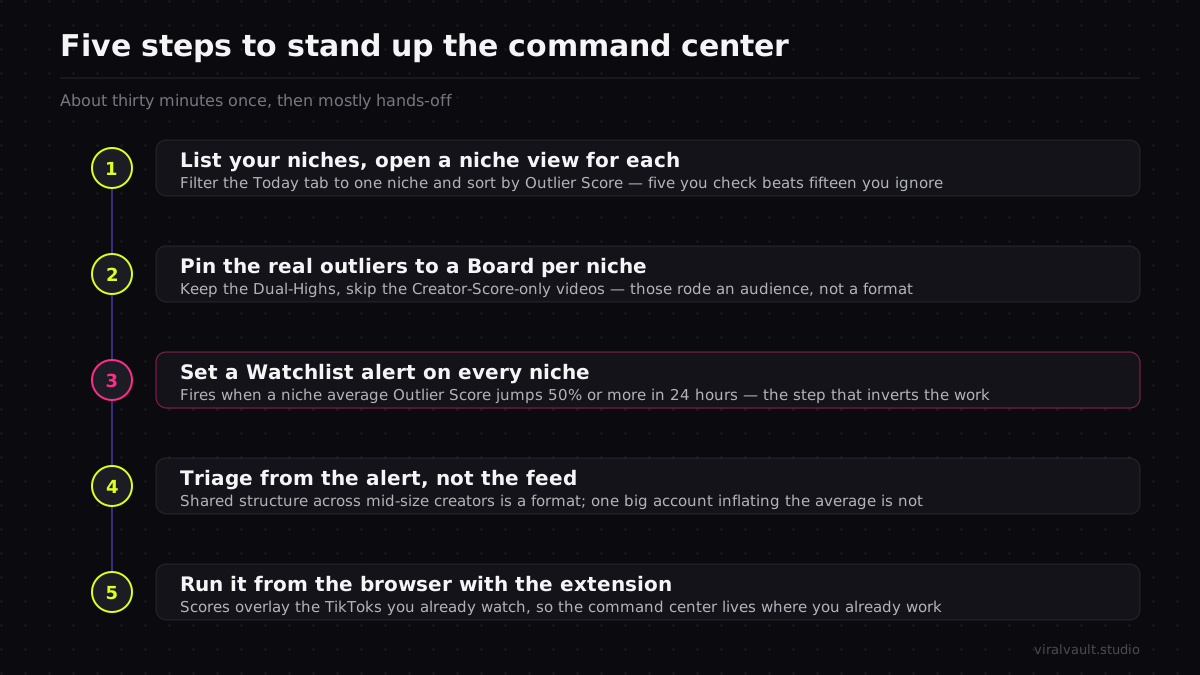
This setup takes about thirty minutes once, then runs mostly on its own. Each step adds one of the three moving parts; by Step 5 the tracker is watching every niche and you are only opening it when an alert tells you to.
Step 1: List your niches and open a niche view for each
Start by writing down every niche you actually need to monitor — your own content niches plus one per client if you run an agency. Keep the list honest: five niches you check is better than fifteen you ignore. Open the Today tab, filter to your first niche, and sort by Outlier Score so the over-performers sit at the top. That filtered, sorted slice is your niche view. Repeat it for each niche on your list. Because the Today tab rescores them daily across all 12 niches, each view stays live without you reloading it, and you now have a content tracking dashboard with one lane per niche instead of one browser tab per niche.
Step 2: Pin the real outliers to a Board per niche
A niche view surfaces candidates; a Board is where you keep the keepers. As you scan each niche view, pin the videos that clear a Dual-High — high Creator Score and high Niche Score together — into a Board named for that niche or client. Skip the videos that are only high on Creator Score; those rode an existing audience and the format will not travel. Each Board becomes a living swipe file of proven structures for one niche, and because you can export any Board as a PNG, the shelf doubles as a deliverable you can hand to a client or drop into a brief without a screenshot dance. One Board per niche keeps the formats sorted by where they belong.
Step 3: Set a Watchlist alert on every niche
Now make the tracker watch the niches for you. Add each niche to your Watchlist so it fires an alert the moment that niche's average Outlier Score jumps 50% or more in 24 hours. That threshold is the system flagging a real surge — a niche where multiple videos suddenly over-perform at once, which usually means a new format just broke. With an alert on every niche, you stop the daily round-robin of opening each view; the quiet niches stay quiet and silent, and the one that moved reaches you the morning it starts climbing. This is the single step that turns the tracker from something you check into something that checks for you, which is the whole point of monitoring multiple niches without a time cost that scales with niche count.
Step 4: Triage from the alert, not the feed
When an alert fires, open only that niche's view and its Board. Read the surge: are several videos sharing one structure, or did a single large account spike the average on audience pull alone? If it is a shared structure across multiple mid-size creators, that is a format worth copying — map its beats, pin the cleanest example to the Board, and ship a version while the window is open. If one big account inflated the number, note it and move on; the alert did its job by letting you rule the niche out in two minutes instead of you discovering it three days late. Triaging from the alert rather than the feed is what keeps a wide tracker from becoming a wide distraction.
Step 5: Run it from the browser with the extension
To collapse the last context switch, wire in the Chrome extension. It overlays Outlier Scores directly on the TikToks you are already watching, so when an alert sends you into a niche you can read the dual-baseline score without leaving the video. Take the format that cleared both baselines back to the AI Hook Writer, which spins five variants across contrarian, listicle, POV, curiosity, and meme angles on GPT-4o mini, so you go from "this niche just broke a format" to "here are five hooks for my version" in a couple of minutes. The command center now lives where you already work instead of in a separate window you have to remember to open.
What running it from one place changes
The shift is from manual breadth to automated breadth. Before, monitoring multiple niches meant rationing attention — a little to each, never enough to any — and the niche you under-watched was the one that mattered that week. After, the alerts hold the breadth for you, the Boards hold the proven formats per niche, and your attention goes only where something actually moved. The number of niches you can credibly cover stops being capped by your hours and starts being capped by how many Boards you want to maintain.
The compounding effect is the Boards. Each one fills with structures captured as beats, not topics, and those beats port across niches — a reverse-order reveal that broke in finance works in fitness because the tension it builds has nothing to do with the subject. An agency running this exact setup rebuilt its whole research workflow around account-level Boards and niche alerts; the agency workflow breakdown walks through what that did to their research time and pitch pipeline. The tracker is not just faster discovery — it is a growing library that keeps paying out after each individual format cools.
None of this requires watching every network in real time. The breadth that matters for short-form research is breadth across niches and across the Reels and Shorts adaptations of a TikTok-native format — and that is exactly what one tracker, pointed at 12 niches and backed by a dual baseline, is built to give you.
Frequently Asked Questions
Q: What is a cross-platform viral content tracker? A: It is a single tool that watches over-performing content across many niches from one place, instead of you checking each niche by hand. In ViralVault it combines niche views filtered from the Today tab's 12 niches, Boards that save proven outliers per niche or client, and Watchlist alerts that fire when a niche's average Outlier Score jumps 50% or more in 24 hours.
Q: Can I monitor multiple niches at once without checking each one manually? A: Yes — that is the point of the alert layer. Add every niche to your Watchlist and it fires the moment any niche's average Outlier Score surges 50% in 24 hours, so you ignore quiet niches entirely and get pulled only to the one that moved. The Boards and niche views are there when an alert sends you in, so coverage no longer scales with your hours.
Q: Does ViralVault really track viral content across platforms, or only TikTok? A: ViralVault is TikTok-native — the dual-baseline scoring engine reads TikTok. The cross-platform job is breadth across the 12 niches in the Today tab plus the Reels and Shorts adaptations of those formats surfaced through the same index, not a literal scraper crawling every social network. The structures you find travel to Reels and Shorts; the automated scoring stays on TikTok.
Q: How is this different from a content tracking dashboard I check every morning? A: A dashboard you check still depends on you opening it and rationing attention across niches. This command center inverts that: alerts watch every niche and pull you in only on a real surge, Boards hold the proven formats so you are not re-scanning, and the browser extension puts scores on the videos you already watch. You move from checking a dashboard to being notified by one.
Q: How many niches can I track at once? A: The Today tab spans 12 niches and you can set a Watchlist alert and a Board on each, so the practical ceiling is how many Boards you want to maintain, not how many your hours allow. Because every niche is scored on the same dual baseline, adding a niche adds zero comparison overhead — a Dual-High means the same thing in every niche.
Set up your cross-platform viral content tracker today
A cross-platform viral content tracker is not a bigger feed to stare at — it is a command center that watches breadth for you. Build the three parts once: a niche view per niche so outliers float up, a Board per niche or client so proven formats stack into an exportable swipe file, and a Watchlist alert on every niche so the system pulls you in only when one actually surges 50% in a day. Be clear-eyed about the scope — the scoring is TikTok-native, and the breadth is across niches and their Reels and Shorts adaptations, not every network at once. That is enough to stop you checking each niche by hand and start covering far more of them with far less time. Spin up a free account, build your first niche view and Board, and set an alert on every niche you care about — begin at viralvault.studio.