How to Use TikTok Search to Find Content Ideas Your Niche Wants

Your niche is typing its next video idea into the search bar right now. Here's how to harvest those live queries with autocomplete and Creator Search Insights, then cluster them into a ranked idea list.
Your next ten video ideas are already written. Not by you — by your audience, in the search bar, right now. Every time someone in your niche types a half-finished query into TikTok search, the app completes it with the exact phrasing thousands of other people are searching for, and most creators scroll right past that goldmine on their way to guess at a topic instead. This playbook is about harvesting that active demand on purpose: using TikTok search autocomplete plus the Creator Search Insights panel to capture the real queries your niche is typing this week, clustering them by intent, and ranking which clusters are actually worth a shoot. A topic you invented is a bet. A topic ripped straight from the search bar is a request. By the end you will have a repeatable routine that turns the search bar into a ranked idea list — and a way to tell which ideas will over-perform before you ever press record.
Table of contents
- Active search demand beats inventing a topic
- Where to find live search demand in TikTok
- How to harvest what my niche is searching into an idea list
- What changes when you build from search-driven content ideas
- Frequently Asked Questions
- Turn the search bar into your idea engine
Active search demand beats inventing a topic
There is a difference between a topic you think is interesting and a topic an audience is actively hunting for, and that difference is the whole edge. Active search demand is the set of queries people in your niche are typing into TikTok this week — phrased in their words, ranked by how often they look. When you build a video off a live query, you are not hoping the For You page agrees with your taste; you are answering a question that already has a line of people waiting behind it. The topic does half the work of finding you, because every future search for that phrase is a fresh shot at surfacing your video long after the initial push fades.
The catch is that most creators never actually read the demand. They brainstorm from the inside — what they feel like making, what a competitor just posted, what is trending on the feed — and trending is the worst input of all, because by the time a topic is visible on the feed it is already crowded. Search demand sits one layer earlier. A query can be searched ten thousand times a week and still have almost no one building specifically for it, because creators are too busy chasing the feed to mine the bar. That gap between what your niche is searching and what your niche is making is where search-driven content ideas come from.
This matters more every year because TikTok search is becoming a genuine discovery surface. A growing share of users — younger ones especially — open the app to look something up the way an earlier generation opened a search engine, typing product questions, how-tos, recipes, and places straight into TikTok. TikTok's own newsroom has documented that shift toward search as a primary behavior. The practical read: the queries you harvest and answer this month keep getting found next month, which makes a search-built library compound while a trend-built one decays.
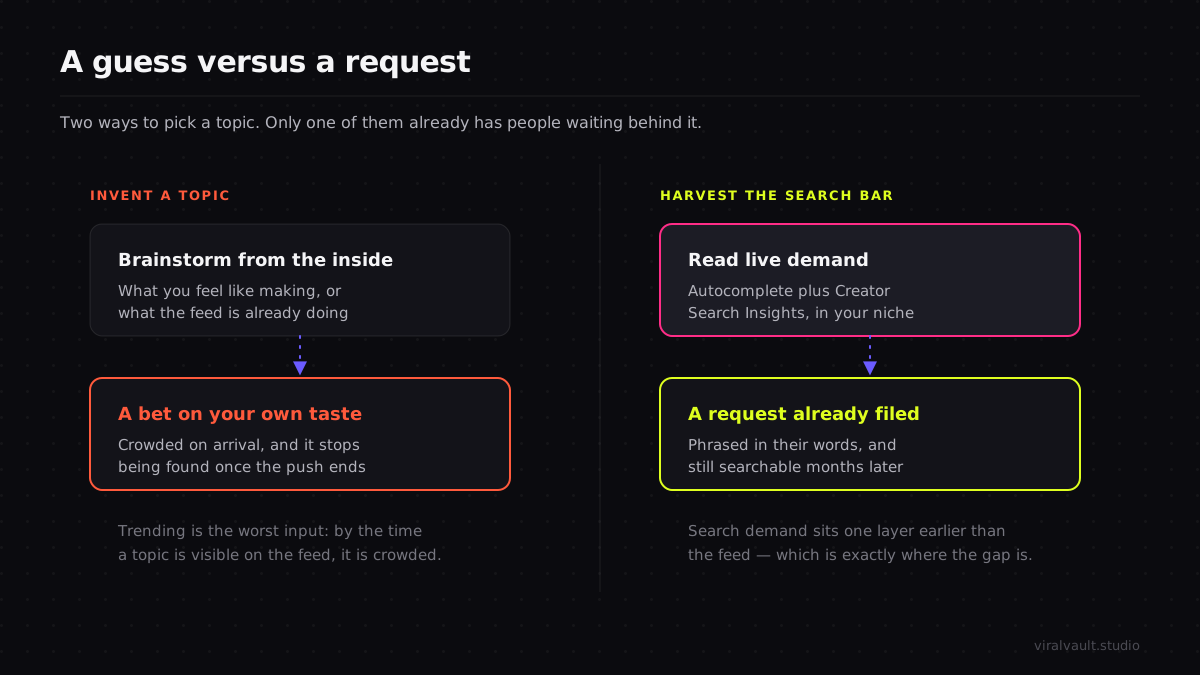
So the reframe is simple. Stop asking what you should make a video about and start asking what your niche is already typing. The search bar is not a place to find your own video after the fact — it is a live feed of demand you can mine before you shoot.
Where to find live search demand in TikTok
Active demand shows up in two places inside the app, and you want both because they cover different blind spots. The first is search autocomplete. Start typing a seed term related to your niche — "budgeting," "meal prep," "skincare for" — and TikTok drops a column of suggested completions underneath. Those suggestions are not random; they are weighted toward what people actually search, so the autocomplete column is essentially a live, ranked list of real queries spun out from your seed. Type a seed, read the column, then type the next seed. Ten seeds give you a wall of real phrasings in minutes, in your audience's exact words rather than your own.
The second source is TikTok Creator Search Insights, the in-app panel that shows search terms organized by topic and filterable to your niche, including the recommended searches TikTok surfaces for creators in your space. Autocomplete is fast and reactive — great for spinning many phrasings off a known seed. Creator Search Insights is structured and curated — great for catching demand you would never have thought to seed in the first place, because it shows terms TikTok already associates with your niche. Using TikTok search for ideas works best when you run both: autocomplete to go wide off your seeds, Insights to catch the demand outside your imagination. For the full tour of where Creator Search Insights lives, how its niche filters behave, and how to read its demand and content-gap signals, the TikTok Creator Search Insights complete guide is the overview; this playbook is about the harvesting routine on top of it.
Before you build a single idea you harvest, pressure-test it against real performance data — run a free ViralVault search on the cluster's topic to see which video structures are already over-performing on it, so you answer the query with a format proven to travel.
One discipline keeps this honest from the start. Neither source hands you a precise monthly search volume you can paste into a spreadsheet. Autocomplete ranks suggestions roughly; Creator Search Insights shows relative interest, not exact counts. Treat every reading as directional — "this phrasing is clearly searched a lot," never "this gets exactly N searches." Inventing a hard number where TikTok only gives a relative signal is the fastest way to commit a confident wrong decision.
How to harvest what my niche is searching into an idea list
This routine takes about thirty minutes and converts a blank content calendar into a ranked list of search-driven content ideas. Run it as a sequence — harvest, then cluster, then rank against performance, then ship — because the ordering is what turns a pile of raw queries into a plan instead of a brainstorm you cherry-pick from.
Step 1: Seed the search bar and harvest every completion
Open TikTok search and list eight to twelve seed terms that sit at the center of your niche — the broad nouns and verbs your audience cares about. Type each seed and read the full autocomplete column, capturing every suggested completion verbatim into a note, exactly as TikTok phrases it. Then go a layer deeper: append a letter or a connector to a seed ("budgeting a," "budgeting for," "budgeting in") and harvest the new completions each variation surfaces. This is how you mine what my niche is searching at the granularity that matters — not the broad seed, but the long-tail phrasings hanging off it. Twelve seeds run through this pass will hand you eighty to a hundred and fifty real queries in your audience's own words.
Step 2: Cross-check the harvest against Creator Search Insights
Autocomplete shows you demand spun off the seeds you already thought of. Creator Search Insights catches the demand you did not. Open the panel, filter it to your niche, and scan the recommended and popular searches it surfaces for your space. Add any term that does not already appear in your autocomplete harvest — these are the queries outside your imagination, the ones you would never have seeded because they sit just off your usual angle. Flag anything Creator Search Insights marks as low-content too; a heavily searched query with thin supply is the strongest single entry on your list. By the end of this step your raw harvest is as complete as the app can make it.
Step 3: Cluster the raw queries by intent
A flat list of a hundred and fifty queries is not a content plan — it is noise until you group it. Sort every query into clusters by the underlying question, not the exact wording. "How to start budgeting," "budgeting for beginners," and "budgeting when broke" are three phrasings of one intent: beginners who want a starting point. Collapse them into a single cluster. Do this across the whole harvest and a hundred and fifty scattered queries resolve into ten or fifteen tight intent clusters, each one a potential content series rather than a single video. The cluster is the unit you build from, because one well-structured video can answer an entire cluster of phrasings and surface for every one of them.
ViralVault tip: Once your clusters are ranked, you do not have to ship them one at a time. A single strong video answering a cluster can be cut into a week of search-targeted posts — different hooks, same structural skeleton, each tuned to a different phrasing in the cluster. Repurpose one TikTok into a full week of content walks the exact splitting routine, and ViralVault will score the source video against your niche before you commit the week.
Step 4: Rank clusters against niche Outlier data
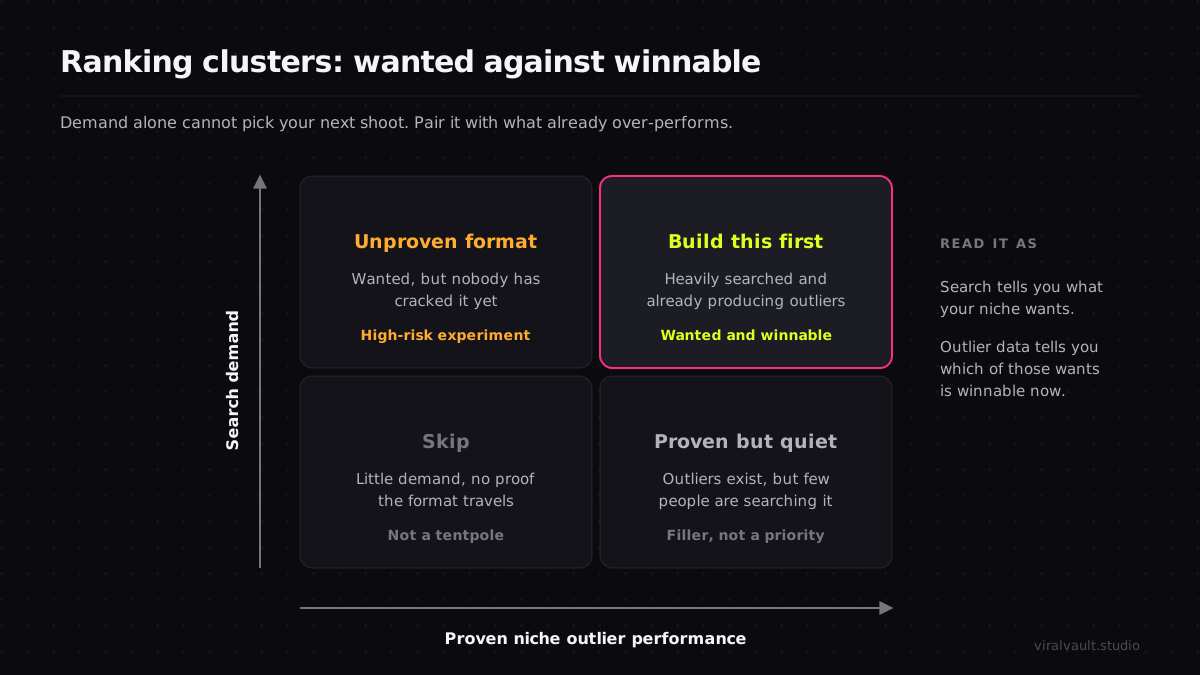
Not every cluster deserves a shoot, and demand alone cannot tell you which ones will land — a heavily searched topic can still be a format graveyard where every existing video underperforms. This is where you pair the harvest with performance. Run each cluster's topic through ViralVault and look at the niche Outlier data: which clusters already have videos posting a high Niche Score, beating the niche median by a wide margin, and which are flat. A cluster with strong search demand and proven outliers is a green light — wanted and winnable. A cluster with demand but no outlier ever is a warning that the format has not been cracked yet, which is either a hard pass or a high-risk experiment, not a tentpole. Rank your clusters by this pairing and you have a prioritized idea list, demand on one axis and proven performance on the other.
Step 5: Build the top cluster with a proven structure
Take your top-ranked cluster and answer it with a format that travels. Pull the over-performing video from your Outlier check, watch it with the sound off, and map its structural beats — where the hook lands, what question it plants in the first two seconds, the order it reveals information, where the payoff is withheld. Build your video on that skeleton but answer your cluster's query, and write the search phrasing into your caption and on-screen text so TikTok connects the video to the term people are typing. Use the AI Hook Writer, which spins five variants across contrarian, listicle, POV, curiosity, and meme angles, to open with a hook that earns the watch. Then ship, and move to the next-ranked cluster. The list keeps feeding you; you never face a blank calendar again.
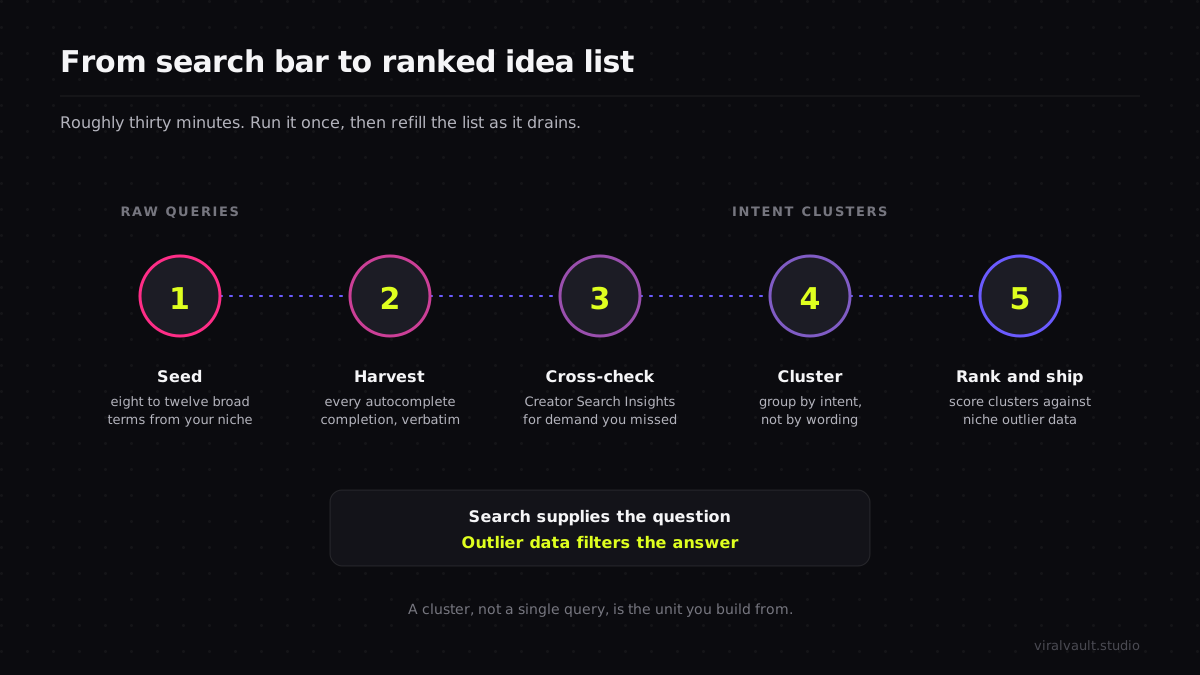
The discipline that holds the whole routine together is treating search as the source of the question and performance data as the filter on the answer. Search tells you what your niche wants; the Outlier data tells you which of those wants is winnable right now.
What changes when you build from search-driven content ideas
The first thing that changes is that the blank calendar disappears. The routine in this playbook turns idea generation from a weekly creative crisis into a harvest you run once and refill as needed — your ranked cluster list is a backlog that keeps paying out, and every shoot starts from a query you know your niche is typing rather than a hunch you hope they share. That alone removes the single most common reason creators stall: not knowing what to make next.
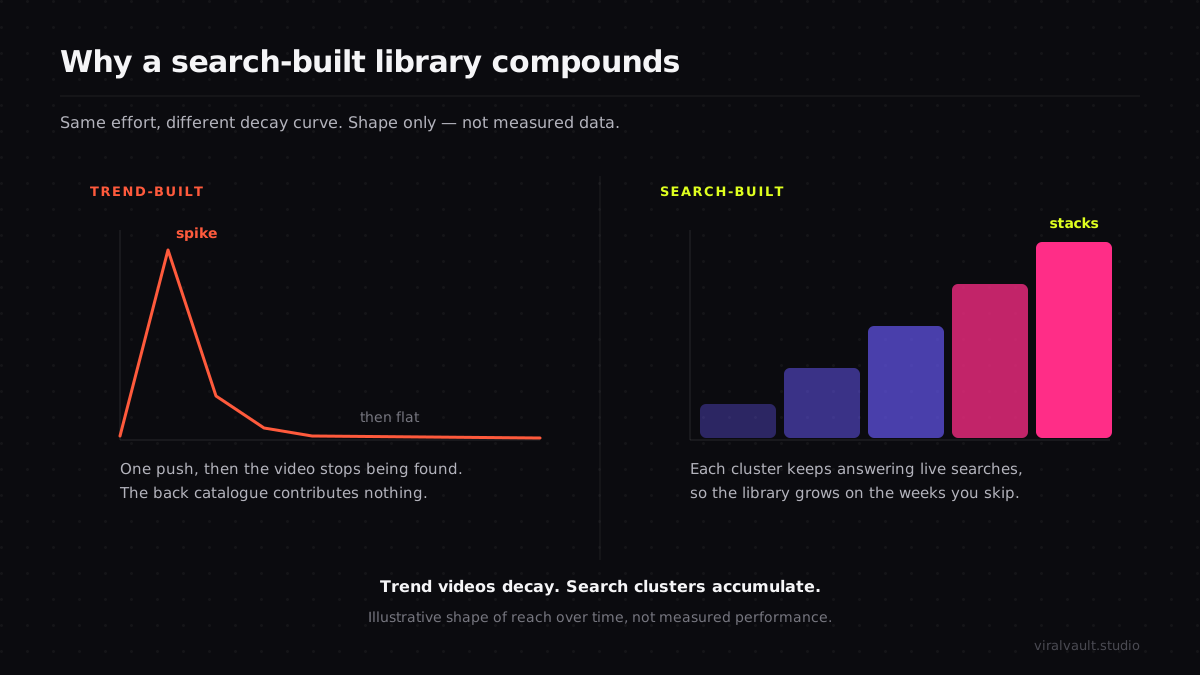
The deeper change is in how your library compounds. Trend-built videos spike and decay; search-built videos keep surfacing every time someone types the query you answered. Build a cluster well and it becomes a small evergreen engine, pulling a steady trickle of searches for months while you move on to the next cluster. Stack a dozen of those and you have a library that grows in reach even on the weeks you do not post, because the back catalog is still answering live searches. The creators who escape the post-or-die treadmill are usually the ones who stopped chasing the feed and started farming the search bar — and they got there by mining demand, clustering it, and ranking it against what actually performs, exactly the routine above. For the wider system of catching rising formats before they saturate, the viral content discovery guide is the companion to this one: this article finds the demand, that one times the format.
If you run TikTok in the browser, the ViralVault Chrome extension overlays Outlier Scores on videos as you watch so harvesting a query, checking its outliers, and drafting the hook all happen without a context switch.
Frequently Asked Questions
Q: How do I find out what my niche is searching on TikTok? A: Use two sources together. Type seed terms into TikTok search and capture the autocomplete column, which is weighted toward real queries, then open Creator Search Insights and filter it to your niche to catch demand outside your seeds. Autocomplete goes wide off terms you know; Insights surfaces searches you would never have thought to type. Together they give you the live query list.
Q: Is TikTok search autocomplete reliable for content ideas? A: It is directionally reliable, not exact. Autocomplete suggestions are weighted toward what people actually search, so the column is a real signal of demand and phrasing. What it does not give you is a precise search volume — treat the ranking as "clearly searched a lot," never as an exact number. Pair the suggestions with niche Outlier data to confirm a wanted topic is also one that performs.
Q: How is this different from using TikTok's content gap tool? A: The content gap tool focuses on high-demand, low-supply topics — finding lanes competitors have not filled. This routine is about harvesting active search demand broadly, clustering every live query your niche types, and ranking those clusters against proven performance. Gaps are one input; here the goal is a complete, prioritized idea list built from what your audience is searching, whether or not the supply is thin.
Q: How many search-driven content ideas should I harvest at once? A: Run eight to twelve seed terms through autocomplete and you will typically capture eighty to a hundred and fifty raw queries, which cluster down to ten or fifteen intent groups. That is enough for weeks of content. Harvest in one focused thirty-minute session, rank the clusters once against Outlier data, then refill only when your backlog runs low rather than re-harvesting every week.
Q: Do I still need format research if a topic has search demand? A: Yes. Search demand tells you a topic is wanted; it does not tell you which structure will hold attention or whether existing videos on it actually over-performed. A heavily searched cluster with no proven outlier is a format that has not been cracked. Always pair the harvested query with a check of the niche Outlier data, then build on a structure that already travels.
Turn the search bar into your idea engine
The premise of this playbook is that you should never invent a topic again while your niche is actively typing its next video into the search bar. Harvest those queries with autocomplete, fill the gaps with Creator Search Insights, cluster the raw list by intent, and rank each cluster against the niche Outlier data so you build what is both wanted and winnable. Search supplies the question; performance data filters the answer; the format you reverse-engineer makes the video over-perform. None of it is a hunch — it is a thirty-minute routine that converts the search bar into a ranked, ship-ready idea list and keeps it refilled. Spin up a free account, harvest your first ten seeds, and turn what your niche is searching into your next month of content, starting at viralvault.studio.