How to Find Viral Content Ideas Without Scrolling Your FYP

Scrolling your FYP for ideas is research with no output. Here's a five-step pipeline that turns discovered outliers into a backlog of your own content — no doomscrolling.
Scrolling the For You page for content ideas feels like work, but it produces almost nothing you can use. An hour of swiping leaves you with a vague sense that "cooking POVs are doing well" and zero structures you can actually shoot tomorrow. The skill worth building is not finding a viral video — the feed hands you those all day — it is knowing how to find viral videos in my niche on purpose, then converting them into a backlog of your own content before the format cools. Those are two different jobs. Doomscrolling is open-ended input with no output; a discovery pipeline is a fixed loop that ends with ideas written down and ready to film. This playbook lays out that pipeline in five steps: search your niche, sort by what is genuinely over-performing, save the structure to a board, adapt the format to your subject, and spin the openers. Run it once and you walk away with a week of ideas instead of a sore thumb.
Table of contents
- Why scrolling for ideas produces nothing
- The pipeline: from discovery to a content backlog
- Step-by-step: how to find viral videos in my niche and bank the ideas
- What a full idea backlog changes
- Frequently Asked Questions
- From scroll to backlog, every week
Why scrolling for ideas produces nothing
The For You page is engineered to keep you watching, not to make you productive. Every swipe is optimized to serve the next video that holds your attention, which means the feed actively resists the thing you opened it to do: step back, compare, and decide what to make. You came to research and the interface quietly converts you into an audience. That is why an hour of scrolling leaves you entertained and empty-handed.
There is also a measurement problem underneath the attention problem. The feed shows you what is big, and big is the one signal you cannot act on. A video with two million views from a creator who always pulls two million tells you nothing — there is no format breaking through, just a large account having an ordinary day. The structures actually worth stealing are the ones over-performing relative to a baseline: a video doing 5x its creator's normal numbers, or 6x the niche median. Those do not announce themselves with a big view count, so scrolling walks you right past them while you stare at the obvious hits everyone else is already copying.
The fix is to stop treating discovery as something you watch and start treating it as something you query. Instead of an infinite feed, you want a finite, sorted list of the formats over-performing in your exact lane right now — and then a place to put them. The ViralVault index tracks 23,000+ videos across 7,800+ creators and rescores them daily, so the question shifts from "what will the feed show me next" to "show me the top outliers in my niche, sorted." That single reframe is the difference between research with no output and a repeatable way to find viral content ideas.

A query has an end. A feed does not. The moment your discovery has a stopping point — the top ten outliers in your niche this week — you can move from looking to building, which is where every actual idea comes from. For the underlying method of catching those rising formats before they peak, the viral content discovery guide lays out the full lifecycle this pipeline plugs into.
The pipeline: from discovery to a content backlog
The reason scrolling fails is that it has no second half. You consume, then you close the app, and nothing carries over to the next day. A pipeline fixes that by making the output the point: every pass ends with structures captured in a place you will see again, not vague impressions that evaporate by lunch.
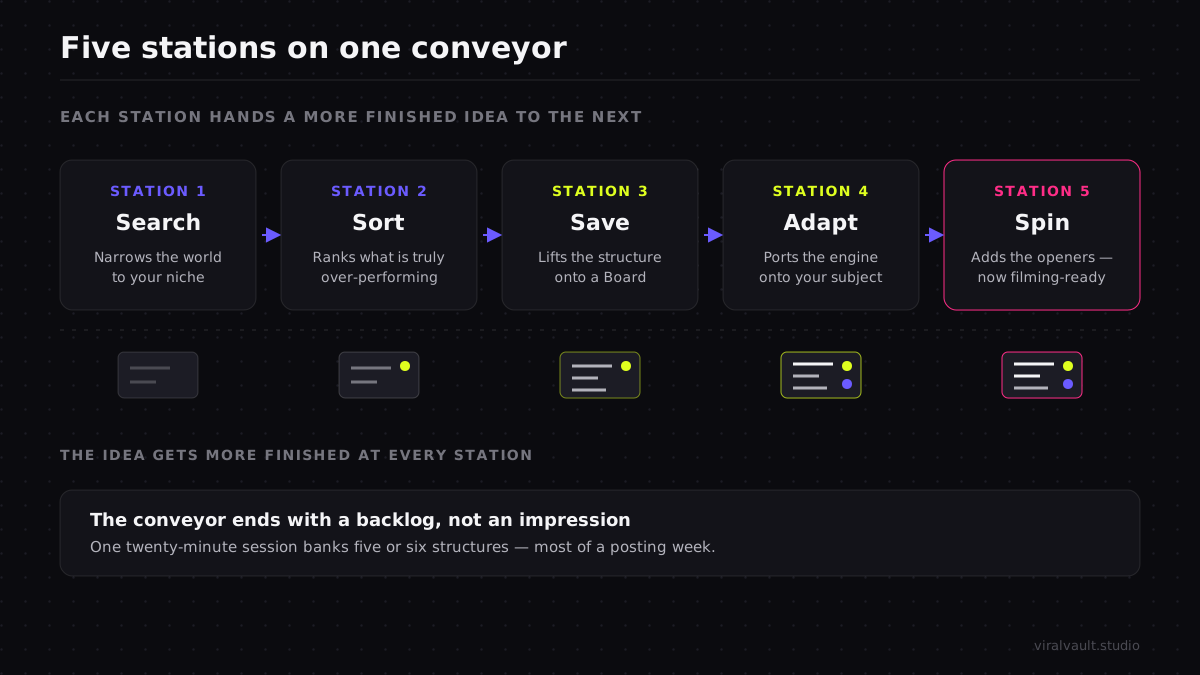
Think of it as five stations on a conveyor. Search narrows the world to your niche. Sort ranks what is genuinely over-performing so you skip the big-account noise. Save lifts the winning structure out of the feed and into a board before it gets lost. Adapt rewrites that structure for your subject so you are copying the engine, not the paint. Spin generates the openers so the idea is filming-ready, not a half-thought. Each station hands a more finished object to the next, and the conveyor ends with a backlog — a written list of ideas you can pull from on any day you sit down to film, including the days when inspiration is nowhere.
The key shift is that you are no longer hunting for a video to copy. You are running a batch process that fills a queue. One twenty-minute session can bank five or six structures, which is most of a posting week, so the loop does not need to run daily — it runs when the queue gets low. That is the entire premise of how to find viral content ideas without scrolling: replace the open-ended habit with a closed loop that has a finish line and a deliverable.
ViralVault tip: Treat the board as your real output, not the videos you watched. If a discovery session ends without at least three structures saved to a board, the session did not happen — you just scrolled with extra steps. ViralVault lets you save any outlier's structure to a Board, export it as a PNG, and build the queue free, no card required, at viralvault.studio.
Step-by-step: how to find viral videos in my niche and bank the ideas
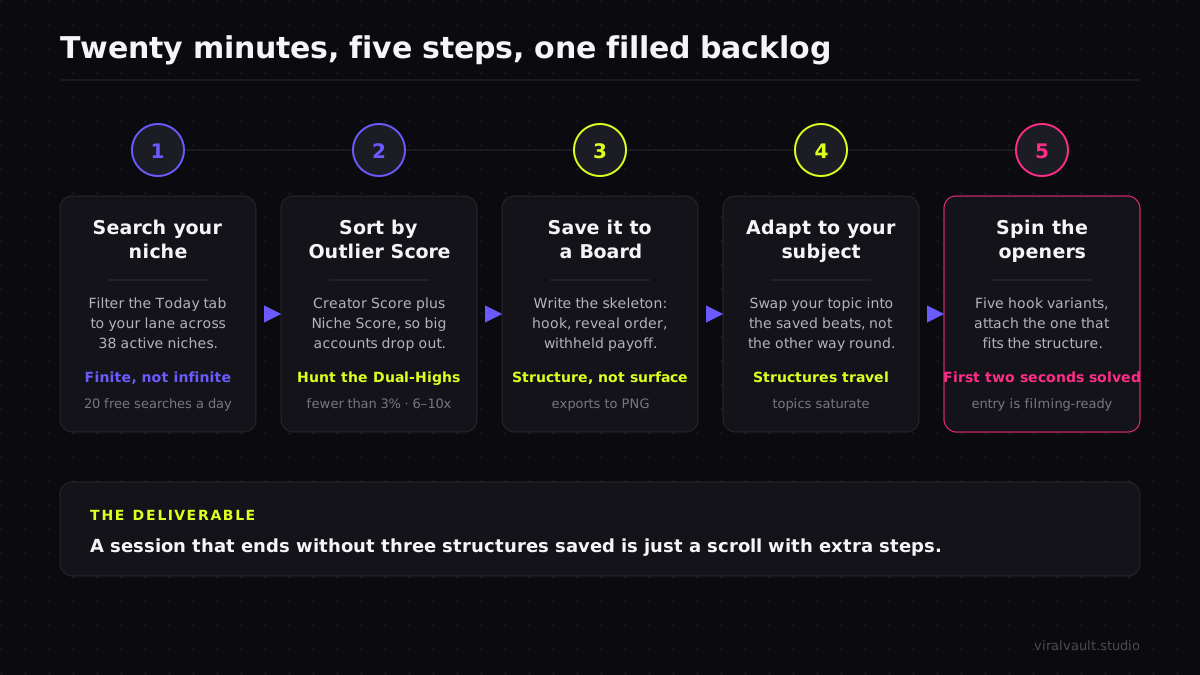
This routine takes about twenty minutes and ends with a filled backlog. Run it when the queue runs low, not on a doomscroll loop.
Start each session from a sorted list instead of the feed — search your niche and rank the outliers so the first thing you see is what is over-performing, not whatever the algorithm wants you watching next.
Step 1: Search your niche, not the open feed
Begin with a query, not a swipe. Open the Today tab, which curates what is over-performing across 12 active niches and rescores them daily, and filter to your lane. This is the move that ends doomscrolling: instead of an infinite stream optimized to keep you watching, you get a bounded set of videos that are punching above their weight in your exact niche right now. The free tier gives you 3 searches a day, which is far more than a single planning session needs. The goal of this step is narrow and finite — turn "the entire internet" into "the videos that matter to me, listed," so you have something you can finish reading.
Step 2: Sort by Outlier Score to skip the noise
A list is only useful once it is ranked by the right number, so sort by Outlier Score. The Outlier Score combines a Creator Score — how far the video beat that creator's own 30-day median — with a Niche Score — how far it beat the niche median — so the top of your sorted list is structures that genuinely broke through, not big accounts having a normal day. Look hardest for a Dual-High, a video that clears both baselines at once — at least five times the creator's own median and three times the niche median. Few videos clear both, so a shortlist of them is the densest possible source of ideas worth your time. Ranking this way also lines you up with how the platform itself distributes video: TikTok's own newsroom describes a For You system driven by watch time and completion rather than follower count, which is exactly what an over-performing outlier signals. This sort is what scrolling can never do: it surfaces the quietly over-performing format you would have swiped straight past.
Step 3: Save the structure to a Board
The instant you find a winner, get it out of the feed and into a board — this is the step that converts a fleeting impression into a durable idea. Do not save the video as "that cooking one I liked"; save its structure as a sequence of beats. Watch it twice with the sound off and write the skeleton: where the hook lands, what question the first two seconds plant, the order information is revealed, and where the payoff is withheld to drive completion. Drop that onto a Board so it is waiting for you on a day you need an idea and have none. A Board lives at its own URL and exports to PNG, so your backlog is a real artifact you can scan, reorder, and pull from — not a memory that fades by the next morning. This is the difference between a content swipe file and a closed tab.
Step 4: Adapt the format to your subject
A saved structure is raw material, not a finished idea, so the next move is to port it onto your own topic. Take the skeleton — "result first, then the three steps that produced it, payoff held to the last frame" — and swap in your subject. Topics saturate; structures travel, which is why a reverse-order reveal that popped in finance ports cleanly into cooking or fitness without competing with the original at all. Adapting rather than cloning is also what keeps your version from landing as the nine-hundredth copy of a specific video the feed has already seen this week. If you want to squeeze a full week of posts out of one strong structure, the one-clip-to-a-week repurposing method shows how to spin a single skeleton into multiple angles so the backlog stretches further.
Step 5: Spin the openers with the AI Hook Writer
An idea is not filming-ready until it has an opener, so finish each backlog entry with hooks. Run the AI Hook Writer, which uses GPT-4o mini to spin five variants across contrarian, listicle, POV, curiosity, and meme angles, then attach the one that fits the structure you saved — a reverse-order reveal wants a hook that teases the result, a listicle wants one that promises the count. Generating five and choosing one means every idea in your backlog arrives with its first two seconds already solved, which is the part most creators stall on at the camera. For the craft of steering sharper, higher-converting variants, the hook writer prompt guide breaks down how to direct the output. Now the entry is complete: a proven structure, adapted to your subject, with an opener ready to shoot.
What a full idea backlog changes
The shift is from finding an idea to pulling one. Before, every filming day started with the same dread — open the app, scroll for inspiration, hope something sparks. After, you open a board and pull the next entry off a queue that future-you already stocked. The creative pressure moves off the moment you are holding the camera and onto a calm twenty-minute planning session you run once a week. That alone removes the single most common reason creators miss a posting day.
It compounds, too. A backlog captured as structures keeps paying out long after any one trending sound cools, because the beats port across niches and subjects indefinitely. Set a Watchlist on your niche so the morning an average Outlier Score jumps 50% or more in 24 hours, the rising format reaches you and refills the queue before the copies arrive. The creators who post consistently are rarely more inspired than the ones who stall; they have simply replaced doomscrolling with a pipeline that hands them a backlog, so showing up is a matter of reading the next card, not summoning a new idea from nothing.

If you run TikTok in the browser, the Chrome extension overlays Outlier Scores directly on the videos you are already watching so capturing a structure to your backlog happens without ever leaving the video.
Frequently Asked Questions
Q: How do I find viral videos in my niche without scrolling for hours? A: Replace the feed with a query. Filter the Today tab to your niche, sort by Outlier Score, and read the finite ranked list of videos over-performing relative to their creator and niche baselines. That returns the structures worth stealing in minutes, then you save them to a Board so each session ends with ideas banked instead of an hour of swiping with nothing to show.
Q: Why is scrolling my FYP a bad way to find content ideas? A: The For You page is built to keep you watching, not to help you research, and it ranks by raw size — the one signal you cannot act on. A two-million-view video from a two-million-follower account is not a format breakout. Scrolling shows you the obvious hits everyone is already copying and hides the quietly over-performing structures, so it produces entertainment, not usable ideas.
Q: How do I turn a viral video I found into my own content? A: Save its structure, not its surface. Map the skeleton — hook, reveal order, withheld payoff — to a Board as a sequence of beats, then adapt those beats to your subject so you copy the engine, not the paint. Finish by spinning five openers with the AI Hook Writer and attaching the one that fits. Now the idea is filming-ready, not a vague impression.
Q: How do I stop doomscrolling for ideas and still keep a full content pipeline? A: Make discovery a closed loop with a deliverable. Run a twenty-minute search-sort-save-adapt-spin session when your queue runs low, banking five or six structures — most of a posting week — to a Board each time. Set a Watchlist to refill the backlog when a niche format spikes. The queue, not the scroll, becomes the source you pull from on filming days.
Q: How many content ideas can one discovery session produce? A: Usually five or six, which covers most of a week. Because you sort by Outlier Score and target Dual-High videos — the few that clear at least five times their creator's median and three times the niche median at once — the top of your list is dense with structures worth saving. Capture each as beats on a Board, adapt and add hooks, and one focused session fills the queue without any open-ended scrolling.
From scroll to backlog, every week
The honest answer to how to find viral videos in my niche is that you stop watching the feed and start querying it. Scrolling is open-ended input that produces nothing you can shoot; a pipeline is a closed loop that ends with ideas written down. Search your niche instead of the open FYP, sort by Outlier Score to skip the big-account noise, save winning structures to a Board, adapt the format to your subject, and spin the openers so every entry is filming-ready. The output is a backlog you pull from on the days inspiration does not show, which is most of them. None of it is talent — it is a twenty-minute loop that replaces the scroll. Spin up a free account, run one discovery session, and walk away with a week of ideas banked instead of a sore thumb — start at viralvault.studio.