How to Track What's Going Viral in Your Niche Without Scrolling

Scrolling is not a tracking system — it is a slot machine. Here is the standing setup that surfaces rising formats to you each morning, so you stop hunting trends and start receiving them.
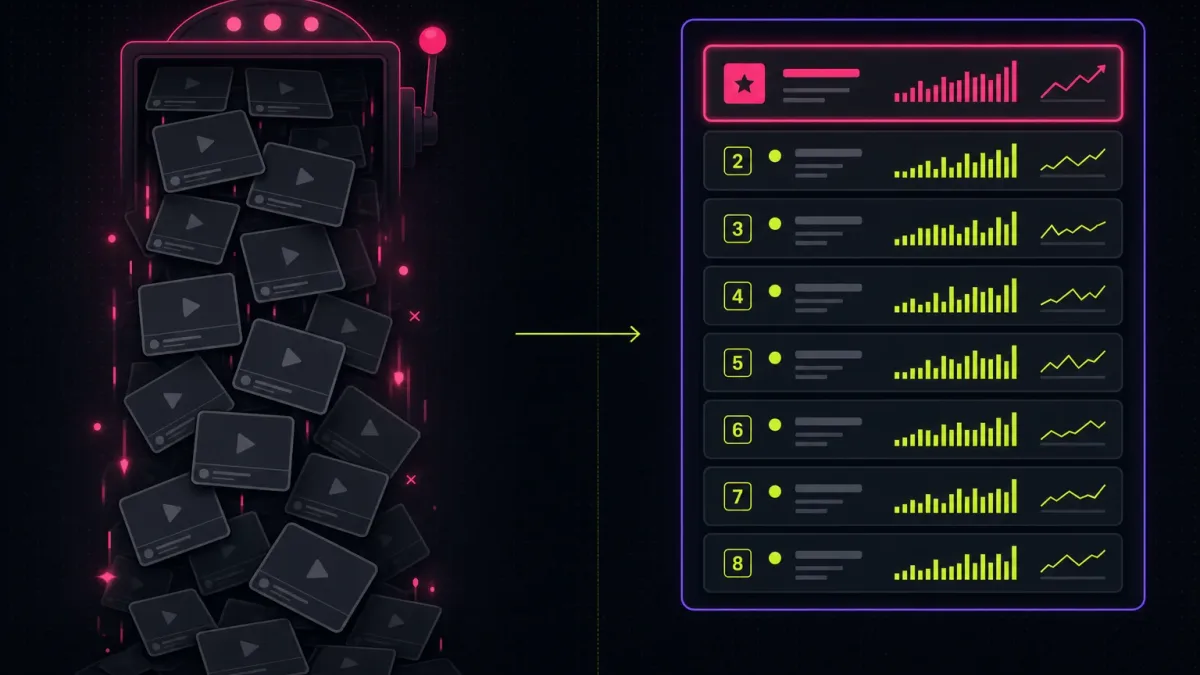
Open TikTok to "see what's trending" and an hour later you have watched forty videos, saved three, and learned nothing you can act on. Scrolling feels like research, but it is a slot machine wearing a lab coat — the next rising format might be in the next swipe, or it might not surface for another week. To actually find trending content before it peaks, you need the opposite of a feed: a standing system that watches your niche on a schedule and hands you a ranked shortlist, so the trends come to you instead of you fishing for them. The good news is that the whole setup takes one afternoon to build and about ten minutes a day to run. This guide walks through the three layers of a daily content monitoring workflow — ranked Outlier-scored lists, the Today tab, and Watchlist alerts — then shows you exactly how to assemble them so you can close the app and let the system do the scanning.
Table of contents
- Why scrolling fails as a tracking system
- The three layers that replace the feed
- How to find trending content before it peaks, step by step
- What the ten-minute routine looks like
- Frequently Asked Questions
- Build the system once, run it forever
Why scrolling fails as a tracking system
The For You page is engineered to keep you watching, not to keep you informed. That is the entire conflict. A feed optimizes for the next dopamine hit, which means it shows you whatever holds your attention — not whatever is over-performing in your niche right now. Those are different things. A video can be quietly tripling its niche average while the algorithm never surfaces it to you, because your watch history points it somewhere else. So you scroll, you see a handful of big-account posts the system already knows you like, and you mistake "videos I was served" for "the trends in my niche." It is a sampling error dressed up as discovery.
There is a second problem: scrolling has no memory and no baseline. Each session starts cold. You cannot tell whether a video with 200K views is a genuine breakout or just an established account doing its normal numbers, because the feed never shows you the creator's median or the niche median next to it. Without that reference, every big number looks like a trend and every small number looks like a flop — both of which are often wrong. That missing baseline is the same blind spot that makes most creators copy the wrong videos, which is the structural reason laid out in why TikTok content keeps not going viral. You cannot track what you cannot measure, and a feed measures nothing.
The fix is not to scroll smarter. It is to stop scrolling for content ideas entirely and replace the feed with a monitoring layer — something that watches the niche continuously, scores every video against two baselines, and only interrupts you when something actually moves. That layer is what the rest of this guide builds.
The three layers that replace the feed
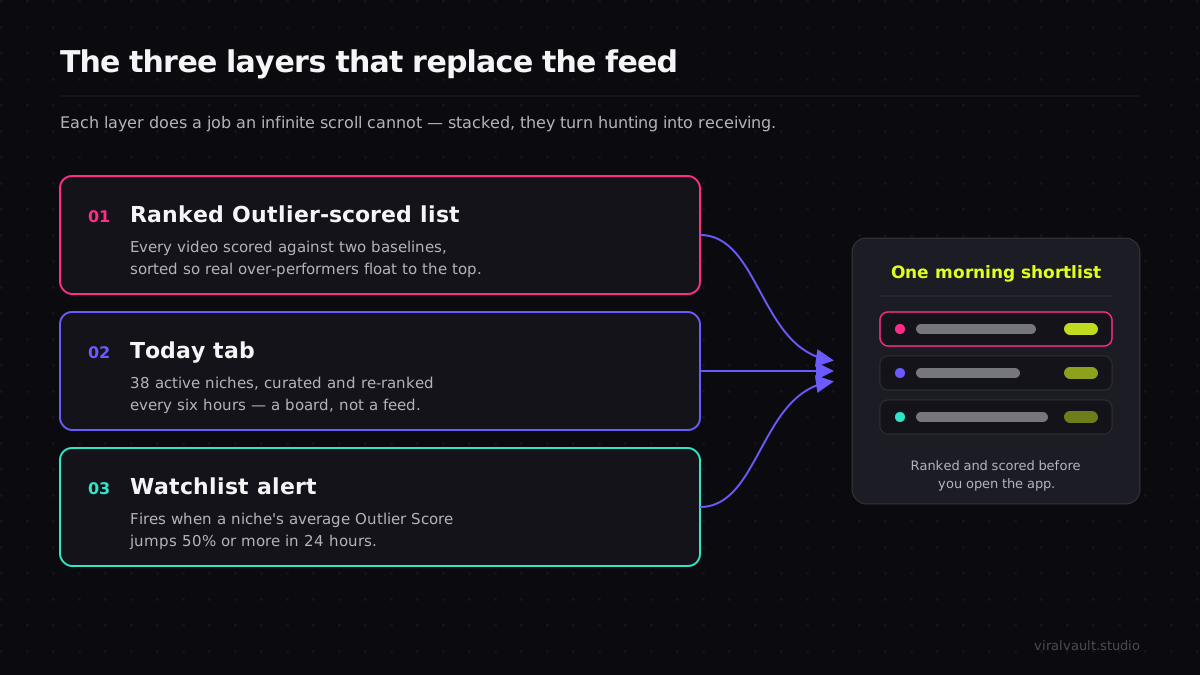
A working daily content monitoring workflow has three layers, and each one does a job the feed cannot. Stack them and you go from hunting to receiving.
The first layer is the ranked Outlier-scored list. Instead of judging a video by raw views, ViralVault scores every video in the index of 23,000+ videos across 7,800+ creators against two baselines at once: a Creator Score, which measures the video against that creator's own 30-day median, and a Niche Score, which measures it against the niche median. Sort a niche by Outlier Score and the over-performers float to the top regardless of follower count — the small account that just 8x'd its niche outranks the mega-account doing its usual numbers. That is the list a feed can never give you, because the feed has no concept of "normal for this niche." The exact math, including how new creators and thin niches are handled, is broken down in the Outlier Score explainer.
The second layer is the Today tab. It curates what is over-performing across 12 niches and rescores them daily, so you open to a pre-ranked board of what is hitting today rather than an infinite scroll of whatever the algorithm feels like serving. Filter it to your niche and you have a standing dashboard of fresh outliers, rebuilt four times a day, with zero scrolling. This is the daily heartbeat of the system — the thing you check each morning instead of opening the app cold.
Run any TikTok in your niche through a free ViralVault search and read both baselines before you ever decide it is a trend — start scoring videos free, no card required.
The third layer is the Watchlist alert, and it is what lets you close the app entirely. A Watchlist watches a niche for you and fires when that niche's average Outlier Score jumps 50% or more in 24 hours — a niche-pop signal that a format is catching across multiple creators at once, not just one lucky video. That alert reaches you the morning the surge starts, which is precisely the window where a format is rising but not yet copied to death. The Dual-High videos that drive these pops — the ones that beat both their creator median and the niche median — number 1,400+ across the whole index, so an alert pointed at them is worth more than an hour of manual browsing.
How to find trending content before it peaks, step by step
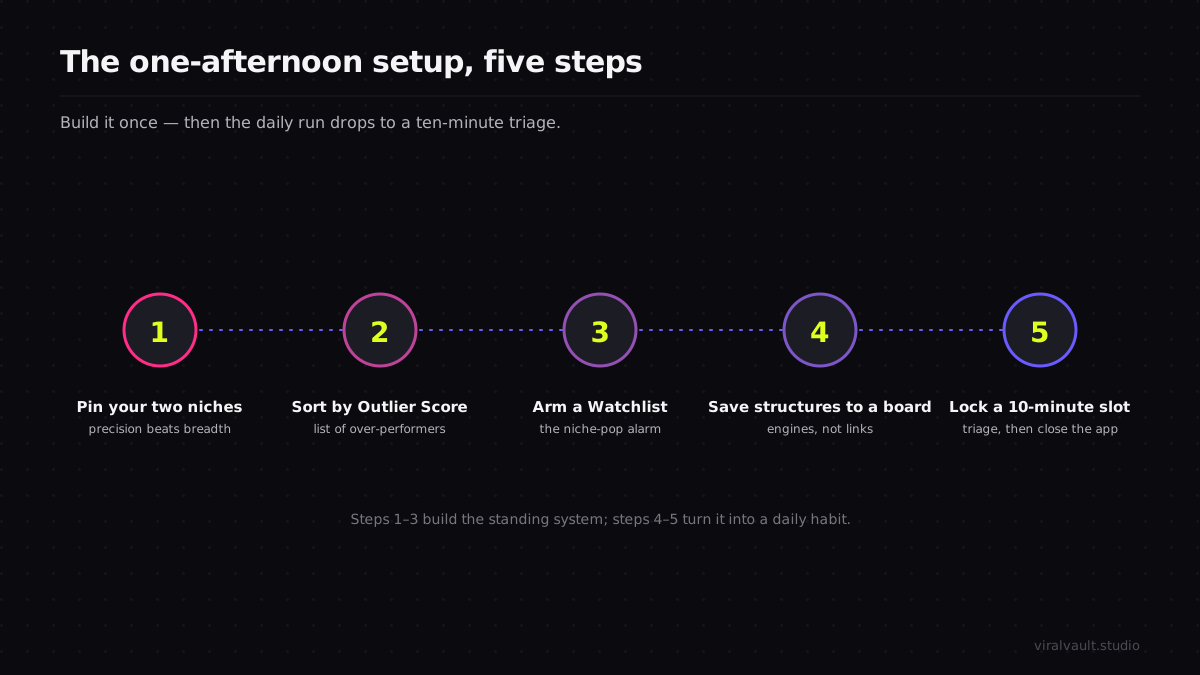
This is the one-time setup. Build it once and the daily run drops to about ten minutes. Each step adds one piece of the monitoring layer so that, by the end, trends arrive as a notification instead of a lucky scroll.
Step 1: Pin your two niches, not ten
Pick the one or two niches you actually post in and commit the system to those. Tracking ten niches sounds thorough but produces noise you will start ignoring within a week. Two niches keep the signal dense: you will recognize the regular creators, learn the niche median by feel, and spot an anomaly instantly because you know what normal looks like. Open the Today tab, filter to your first niche, and bookmark that filtered view as your home screen. Precision beats breadth — a tightly watched niche surfaces real outliers; a broadly watched one buries them.
Step 2: Set the ranked list to sort by Outlier Score
Switch your niche view from "most recent" or "most viewed" to sort by Outlier Score, descending. This is the single setting that converts a list of videos into a list of over-performers. Now the top of the page is whatever is beating its baselines hardest right now, with the Creator Score and Niche Score shown side by side so you can read at a glance whether a video is a community-pull story (high Creator Score, ordinary Niche Score) or a true format story (high Niche Score). You want the format stories — those are the structures that travel and that you can actually rebuild. Leave this sort locked; it is the lens for every morning scan that follows.
Step 3: Arm a Watchlist on each pinned niche
Add a Watchlist to each niche you pinned in Step 1. This is the layer that lets you stop checking obsessively. The Watchlist fires when the niche's average Outlier Score jumps 50% or more in a 24-hour window, which means a format is popping across several creators at once — the earliest reliable sign that something is about to become The Thing in your niche. Because the alert lands the morning the surge begins, you get to the format in its rising phase, before the feed fills with copies. Configure it once and the system now watches the niche on the daily scoring cycle so you do not have to.
Step 4: Save winners to a board as structures, not links
When the ranked list or an alert surfaces a real outlier, do not just bookmark the video — capture why it worked. Save it to a board and write one line describing the structure: "result shown first, then the three steps that produced it, payoff held to the final frame." You are building a swipe file of engines, not a folder of links. A board of structures keeps paying out long after any single sound cools, because those structural beats port across niches and across months. This is the asset the whole system is quietly compounding into. The full early-detection logic behind reading these signals lives in the viral content discovery guide.
Step 5: Lock a ten-minute morning slot and close the app
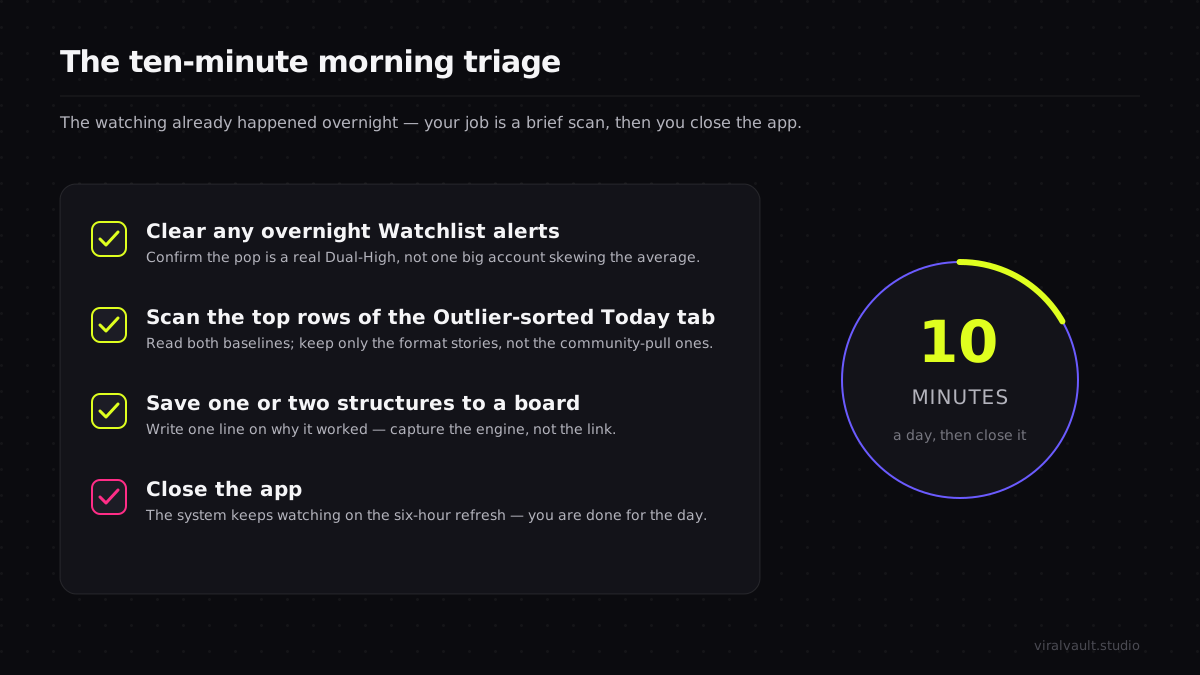
Put a recurring ten-minute block on your calendar — same time every day, ideally before you make anything. In that block you do three things: clear any Watchlist alerts from overnight, scan the top of your Outlier-sorted Today tab, and save one or two new structures to the board. Then you close the app. That last part is the point. The system has already done the watching; your job is a brief triage, not an open-ended browse. The discipline of a fixed, short slot is what keeps this a tool instead of a time sink — and it is the habit that quietly separates creators who stay early from creators who scroll.
What the ten-minute routine looks like
Once the system is built, a normal morning is almost boring, which is the goal. You sit down to the ten-minute block. Maybe a Watchlist alert fired overnight — your cooking niche jumped 60% on average Outlier Score, so something is popping. You open the alert, see three creators all running a variation of the same reverse-reveal structure, confirm two of them are genuine Dual-Highs and not one big account skewing the average, and save the structure to your board with a one-line note. No alert? You glance at the top five rows of your Outlier-sorted Today tab, nothing new is breaking, you save nothing, and you close the app. Either way you are done in minutes and you have missed nothing, because the watching happened without you.
ViralVault tip: Treat a fired Watchlist alert as a same-day signal, not a someday bookmark. A niche-pop means the format is rising now; in a fast niche it can saturate within days. When an alert lands, check the structure, confirm it is a real Dual-High, and shoot your version that day — the head start is the whole point. See how the alerts are unlocked.
The deeper shift is what the routine does to your output over weeks. Because every saved item is a structure with a reason attached, your board becomes a library of proven engines you can pull from whenever you sit down to create — no more staring at a blank calendar hoping the feed coughs up an idea. And because you are catching formats in the rising phase via alerts rather than the saturated phase via scrolling, your versions land earlier, when the format is still fresh to viewers. TikTok's own newsroom has documented how completion and watch time drive what the system surfaces; arriving early, with a structure proven to hold attention, stacks both in your favor. The system does not make you more creative. It makes you earlier and more consistent, which is what actually moves numbers.
Frequently Asked Questions
Q: How do I find trending content before it peaks instead of after? A: Stop relying on the feed, which surfaces formats only after they are big enough to be served to you. Set a Watchlist on your niche so you get an alert when its average Outlier Score jumps 50% in 24 hours — the earliest reliable sign a format is catching across creators. That alert lands in the rising phase, days before the copies arrive and the window closes.
Q: How often should I run a daily content monitoring workflow? A: Once a day, briefly. The index rescores them daily and the Today tab re-ranks across 12 niches on the same cadence, so a single ten-minute morning scan catches rising formats while they are still early. Checking once a week guarantees you arrive at the peak; checking ten times a day is just scrolling with extra steps. A fixed short slot is the sweet spot.
Q: Can I track viral content in your niche without a paid tool? A: Partly. ViralVault's free tier gives you 3 searches a day with no card, enough to score videos in your niche and read both baselines manually. The standing layers that do the watching for you — Watchlist alerts and the curated Today tab — are what turn occasional searching into a hands-off monitoring system, so the format reaches you instead of you hunting it.
Q: Why does scrolling feel productive but rarely surface real trends? A: Because the For You page optimizes for what holds your attention, not for what is over-performing in your niche. It serves you familiar big-account posts your watch history predicts you will like, while a small creator quietly 8x-ing the niche median never reaches you. Scrolling samples the algorithm's guess about you, not the actual state of your niche — that is why it feels like research but acts like a slot machine.
Q: What is the difference between a high Creator Score and a high Niche Score? A: A high Creator Score means a video beat that creator's own 30-day median — a community-pull story driven by their audience. A high Niche Score means it beat the niche median — a format story driven by the structure itself. You want format stories, because those structures travel across creators and niches. A Dual-High beats both at once and is the strongest signal worth saving.
Build the system once, run it forever
The reason most creators never reliably find trending content before it peaks is not effort — it is that they are using a feed, which is built to entertain them, as a research tool, which it was never built to be. Swap it for a three-layer monitoring system and the whole job inverts: a ranked Outlier-scored list shows you the real over-performers, the Today tab rebuilds that board four times a day, and a Watchlist alert taps you on the shoulder the morning a format starts to pop. You spend one afternoon assembling it and ten minutes a day running it, and in exchange you stop scrolling for content ideas and start receiving them, already ranked and already scored against two baselines. The creators who stay early are not glued to the app longer than you — they are the ones who let a system watch for them. Build yours today: spin up a free account, pin your niche, arm a Watchlist, and let it surface the next rising format to you at viralvault.studio.