How a Viral Video Search Engine for Marketers Shortcuts Research

Scrolling the For You page is not research, it is hoping. Here is how to query a searchable index of 23,000+ scored videos like a database and pull your next format in minutes.
Scrolling the For You page for content ideas is not research — it is hoping a pattern walks past while you watch. A viral video search engine for marketers replaces that habit with a query box: instead of waiting for the algorithm to serve you something useful, you ask a searchable index of 23,000+ scored videos a direct question and get a ranked answer back in seconds. The difference is the difference between reading a database and refreshing a feed. The FYP shows you what it wants you to see, tuned to keep you watching; a search index shows you what you asked for, sorted by how far each video out-performed its baseline. For anyone doing content research at speed — a marketer planning a month of posts, a creator hunting next week's format — that shift turns an hour of doom-scrolling into a four-minute query. This guide walks through exactly how to use the search as a content research shortcut: how to query by niche, keyword, and format, how to sort by Outlier Score, how to filter to the rarest winners, and how to save and adapt what you find.
Table of contents
- Why a search box beats the For You page for research
- What a searchable viral index actually indexes
- How to use a viral video search engine for marketers step by step
- How this shortcut changes your research week
- Frequently Asked Questions
- Make the search your first research stop
Why a search box beats the For You page for research
The For You page is optimized for one thing, and it is not your research. It is tuned to maximize the time you spend watching, which means it surfaces what holds your attention — not what is over-performing in the niche you need to plan content for. Two researchers with the same goal get two different feeds, and neither feed is a representative sample of what is actually working. Scrolling it for ideas is sampling a stream that was deliberately personalized away from being a fair sample. You will see things that are big, but you will have no way to tell a format breakout from a mega-account's ordinary Tuesday, and no way to ask it for the specific niche or structure you came for.
A search index inverts all of that. You start with a question — "what is over-performing in personal finance this week," "show me listicle-format videos that broke out," "find videos that beat their creator's median in skincare" — and the index returns a ranked list. You are no longer a passenger; you are running a query. That is the entire premise of treating discovery as search rather than scrolling, and it is why a viral content discovery tool for creators is built around a query box and a sort order instead of an infinite feed.
The deeper distinction is repeatability. A good scroll is luck you cannot reproduce; a good query is a saved search you can run again next Monday and get fresh results from. When your content research is a query, it becomes a routine — a thing you do in four minutes every morning rather than an hour you lose whenever you remember to look. Speed and repeatability are the whole reason to search for viral videos instead of waiting for them to find you.

None of this means the FYP is useless — it is real distribution and a real signal of what an algorithm is pushing. It just is not a research instrument. You would not pick a stock by scrolling whatever ticker happened to autoplay; you would screen. A viral video search engine is the screener for short-form content.
What a searchable viral index actually indexes
A search is only as good as what sits behind the box, so it is worth knowing what you are actually querying. The ViralVault index tracks 23,000+ videos across 7,800+ creators and rescores them daily, which means a query is not hitting a stale archive — it is hitting a near-live picture of what is over-performing right now. The daily cadence matters because short-form formats move in days; a search index that refreshed weekly would hand you formats that already saturated before you finished reading the results.
What makes the index searchable in a useful way is that every video carries a score, not just a view count. Raw views are unsearchable in any meaningful sense — sorting two million videos by view count just floats the biggest accounts to the top and tells you nothing about format. Instead, each video gets an Outlier Score built from two baselines: a Creator Score that measures the video against that creator's own 30-day median, and a Niche Score that measures it against the niche's 30-day median. Sorting by that score is what turns the index from a pile of videos into a ranked answer — the videos that out-ran their own baseline rise, and the mega-account's ordinary day sinks.
The index is also sliced into 12 niches and surfaces what is over-performing through a Today tab, so a query can be scoped to exactly the lane you plan content for. This is where a purpose-built index pulls ahead of searching TikTok directly: the platform's own search is built for viewers, not researchers. TikTok's newsroom has documented Creator Search Insights, which surfaces what people are searching for — genuinely useful demand data — but it shows you topics and gaps, not a ranked list of which specific videos out-performed their baseline and by how much. The two are complementary, not the same tool.
ViralVault tip: Before you commit a single shoot to an idea, run it as a query first. Search your niche, sort by Outlier Score, and read the top ten results — you will learn more about what structure is working in four minutes than in an hour of scrolling. ViralVault gives you 3 searches a day free, no card required, at viralvault.studio.
How to use a viral video search engine for marketers step by step
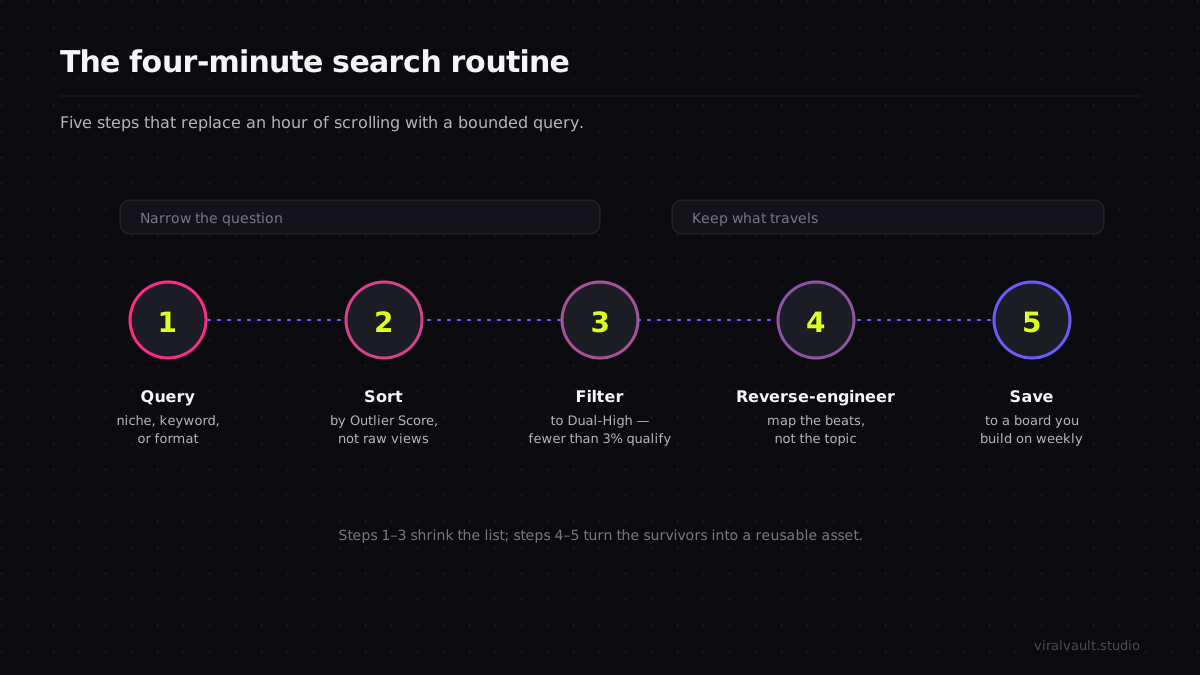
This is the core routine. It takes about four minutes and is designed to end with a proven structure on a board, ready to adapt — not a vague sense that "finance is doing well right now."
Run your niche through the search and sort by Outlier Score before you read another word — start your first query free and follow along with real results in your own lane.
Step 1: Query by niche, keyword, or format
Start with the most specific question you can ask. If you run content for a defined niche, scope the search to it — one of the 12 niches — so every result is already relevant. If you are hunting a particular structure, search by format instead: listicle, POV, contrarian take, before-and-after. The narrower the query, the more useful the ranked list, because you are no longer asking "what is viral" (everything and nothing) but "what is over-performing in this lane, in this shape." A marketer planning a skincare campaign queries skincare; a creator looking to try a listicle queries the listicle format inside their niche. Either way you have replaced an open-ended scroll with a bounded question the index can actually answer.
Step 2: Sort by Outlier Score
Once the results load, sort by Outlier Score so the index ranks the videos by how far each one beat its baseline rather than by raw size. This is the step that does the heavy lifting, and it is the one the For You page can never do for you. A video with 40K views that beat its creator's median by 5x is a stronger format signal than a video with two million views on an account that always gets two million — and sorting by score floats the first to the top while the second drops. You are now reading a list ordered by structural strength, not by audience size. Skim the top of that list and you are looking at the formats most likely to be carried by their structure rather than their distribution.

Step 3: Filter to Dual-High winners
To cut the list down to the genuine standouts, filter to Dual-High — videos where both the Creator Score and the Niche Score are high at once. A Dual-High is the strongest virality signal in short-form video, and it is rare on purpose: 1,400+ videos in the index have cleared both baselines. That scarcity is exactly what makes it a shortcut. A filtered list of them is the highest-signal shortlist the index can produce — a handful of formats that beat both the creator's own ceiling and the niche's typical performance simultaneously. Instead of evaluating fifty videos by hand, you are evaluating five that already passed both tests.
Step 4: Reverse-engineer the structure of the top results
For each Dual-High in your shortlist, watch it two or three times and map the structure, not the topic. Where is the hook, what question does the first two seconds plant, in what order is information revealed, where is the payoff withheld to drive completion or a re-watch. Write it down as a sequence of beats — "result first, then the three steps, payoff held to the final frame" — because the structure is the part that travels across niches, while the subject does not. This is the difference between copying the paint and copying the engine. A reverse-order reveal that broke out in finance ports cleanly to skincare; the specific product does not. Capturing the recipe instead of the dish is what makes one search worth a week of content.
Step 5: Save it to a board and adapt
Send the formats worth using to a Board so the search produces a durable asset, not a screenshot you lose by Thursday. A board at /b/[slug] collects the structures you found, exports to PNG for a brief or a team handoff, and becomes a running swipe file you build on every time you run the search. Then adapt the top structure to your own subject and ship it while the format is still rising — speed is the edge, and a format that ranked today can saturate inside a week. For a broader look at how this search-first workflow compares with the other tools marketers reach for, the best viral content discovery tools of 2026 breaks down where each one fits.
How this shortcut changes your research week
The practical change is that content research stops being a time sink you avoid and becomes a query you run before every planning session. A marketer who used to block an hour to "look for ideas" now opens the search, scopes it to the niche, sorts by Outlier Score, filters to Dual-High, and walks away four minutes later with three proven structures on a board. The hour that used to disappear into the feed goes back into making the content. That is the entire promise of a content research shortcut — not that it finds magic videos a human never could, but that it does in minutes what scrolling does badly in an hour.
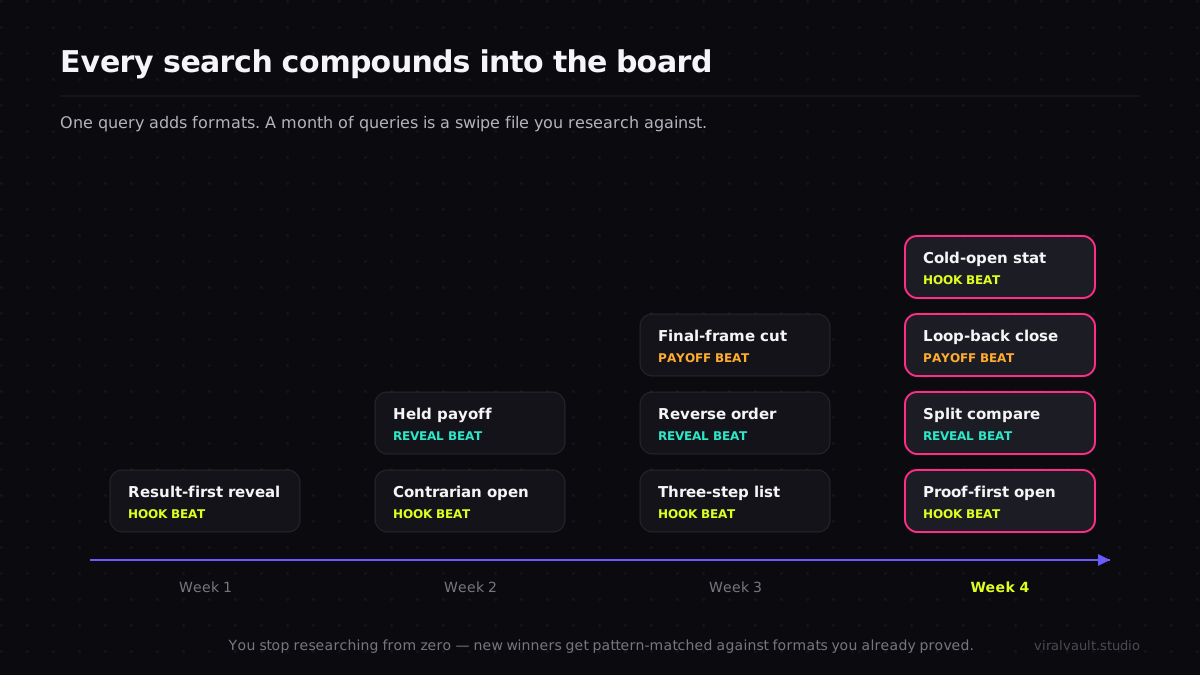
The compounding benefit is the board. Used this way, a viral video search engine for marketers is not a one-off lookup tool but a research habit: every search adds structures to a running swipe file, so over a month you are not starting research from zero each time — you are pattern-matching new winners against a library of formats you already proved travel. The creators and brands who move numbers consistently are rarely the most creative; they are running a tighter research loop and reusing engines instead of chasing topics. To see how this fits the wider discipline of reading what audiences actively search for, the creator search insights guide pairs demand-side search data with the supply-side performance ranking this routine produces.
If you run TikTok in the browser, the Chrome extension overlays Outlier Scores directly on the videos you are already watching and lets you save a format to a board on the spot, so even the scrolling you do for fun quietly feeds the same research library.
Frequently Asked Questions
Q: What is a viral video search engine and how is it different from TikTok search? A: It is a searchable index of short-form videos ranked by how far each one out-performed its baseline, not by view count or recency. TikTok's own search is built for viewers and surfaces topics and demand. A viral video search engine for marketers is built for research — it returns videos sorted by Outlier Score so you can see which formats are carried by structure, not just audience size.
Q: How do I search for viral videos in a specific niche? A: Scope the query to one of the index's 12 niches, then sort by Outlier Score so results rank by how far each video beat both its creator and niche median. Filter to Dual-High to cut the list to the rarest winners — 1,400+ across the whole index. That turns "what is viral" into "what is over-performing in my exact lane right now," which is the question worth answering.
Q: Is searching faster than scrolling the For You page for content ideas? A: Far faster, and more reliable. The For You page is tuned to hold your attention, not to give a fair sample of what works in your niche, so scrolling it for research is sampling a stream personalized away from being representative. A query scoped to your niche and sorted by score returns a ranked answer in seconds, making it a genuine content research shortcut rather than a gamble on what the feed serves.
Q: What should I do with a viral video once the search finds it? A: Reverse-engineer its structure, not its topic — map the hook, the reveal order, and the withheld payoff as a sequence of beats — then save it to a board as a reusable format and adapt it to your own subject. The structure is what travels across niches; the subject does not. Saving builds a swipe file, so every search compounds into a library you research against later.
Q: How current are the results in a viral video search engine? A: In ViralVault's index they refresh daily across 23,000+ videos and 7,800+ creators, so a query returns a near-live picture rather than a stale archive. The cadence matters because short-form formats saturate in days — a search index that refreshed weekly would surface formats that already peaked. Six-hour refreshes keep the ranked results aligned with what is actually rising right now.
Make the search your first research stop
The fastest way to shortcut content research is to stop treating the For You page as a research tool and start treating a viral video search engine for marketers as one. The feed is tuned to hold you, not to answer you; the search is the opposite. Query your niche, sort by Outlier Score so structure beats size, filter to the Dual-High winners, of which there are 1,400+ in the whole index, reverse-engineer the beats rather than the subject, and save what travels to a board you build on every week. The whole routine takes four minutes and replaces the hour you used to lose to scrolling. Spin up a free account, run your first niche query, and pull your next proven format in the time it takes to make a coffee — start at viralvault.studio.